
I Saved $7,189 on Claude Code Tokens. Here’s Every Efficiency Habit That Mattered
220+ sessions, 13,445 turns, four models, five effort levels. Everything ranked by real measured impact.

I’ve spent the last month running controlled benchmarks across Claude Code sessions. Not casual usage. Instrumented runs with token tracking, cost breakdowns, cache hit rates, and instruction-following scores across four models and five effort levels.
Most “tips and tricks” articles for Claude Code read like a feature changelog someone reformatted into listicle form. They throw 30 items at you with no ranking, no cost data, and no indication of what actually moves the needle versus what sounds impressive but saves you nothing.
This is the opposite. Everything here is ranked by real impact, measured in tokens saved, dollars not spent, or bugs avoided. I’ll show you what I found by running my Claude Code session-metrics plugin across hundreds of sessions, what an Anthropic engineer publicly confirmed, and what the official documentation says.
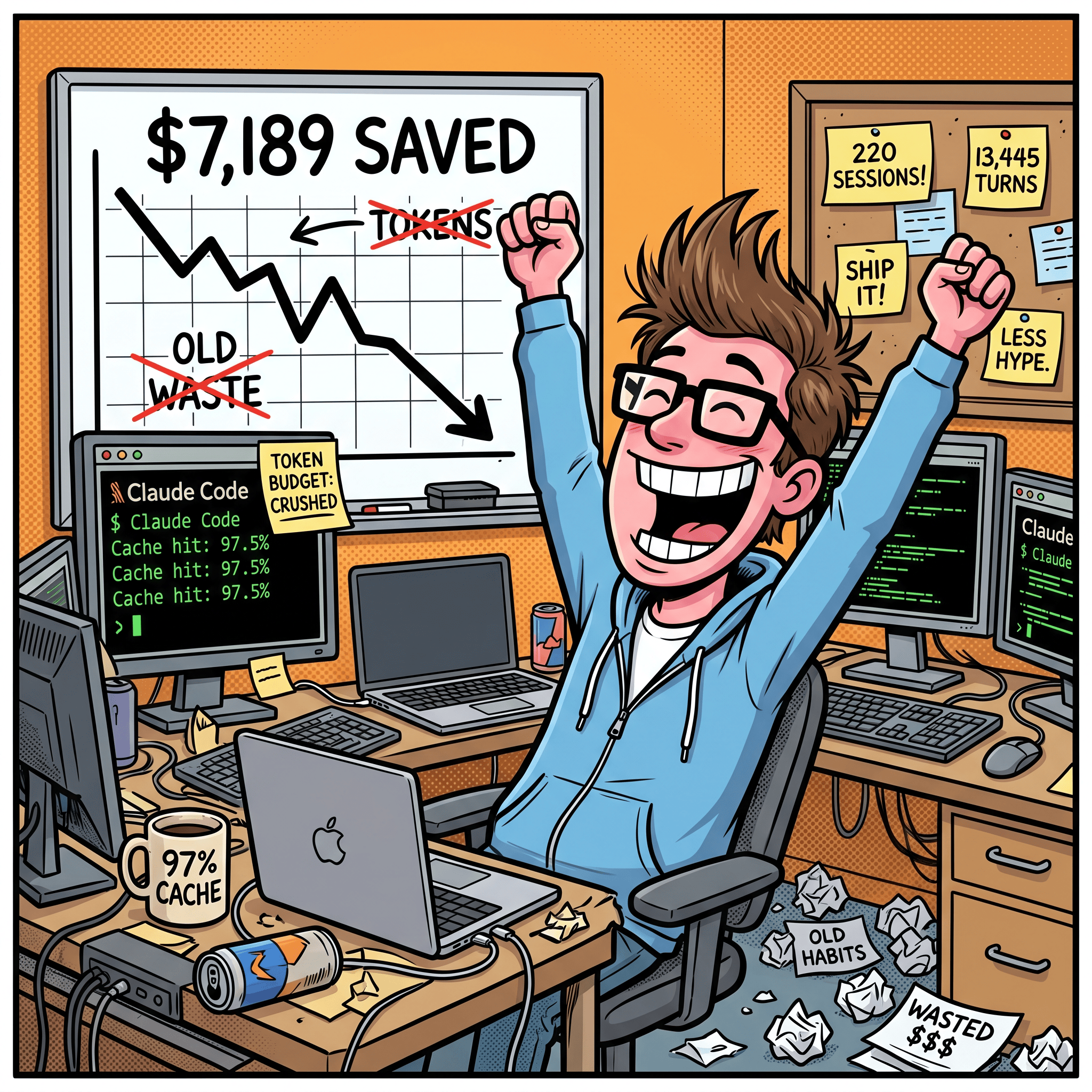
The #1 mistake killing your token budget: one session for everything
The single worst habit I see from new Claude Code users: they open one session and never leave it. Bug fix? Same session. New feature? Same session. Quick question about an unrelated file? Same session. They rely on auto-compacting to keep things running when the context fills up.
This is the biggest killer of both token efficiency and session limits. Here’s why.
Every message you send in a session grows the context. Every file Claude reads stays in the context. When you cram unrelated tasks into one session, the context fills with information from Task A that is pure noise during Task B. Claude reads all of it on every turn. You’re paying tokens for the model to process your bug fix discussion while working on a feature, and your feature discussion while debugging something else.
The most common reason users state for using the single same chat session is that new sessions don’t have context for what they have done. If you properly build context management around the project, Claude Code should be able to remember even in fresh chats. That’s what I do I have CLAUDE.md memory bank system with reference files progressively disclosing information including CLAUDE-activeContext.md which tracks what I am doing right now. I can start a fresh chat and just ask what the next task on my list is or what I did last time. Hint: asking Claude to inspect your git commit history can also help it understand what you did in the past.
Context rot: the silent quality killer
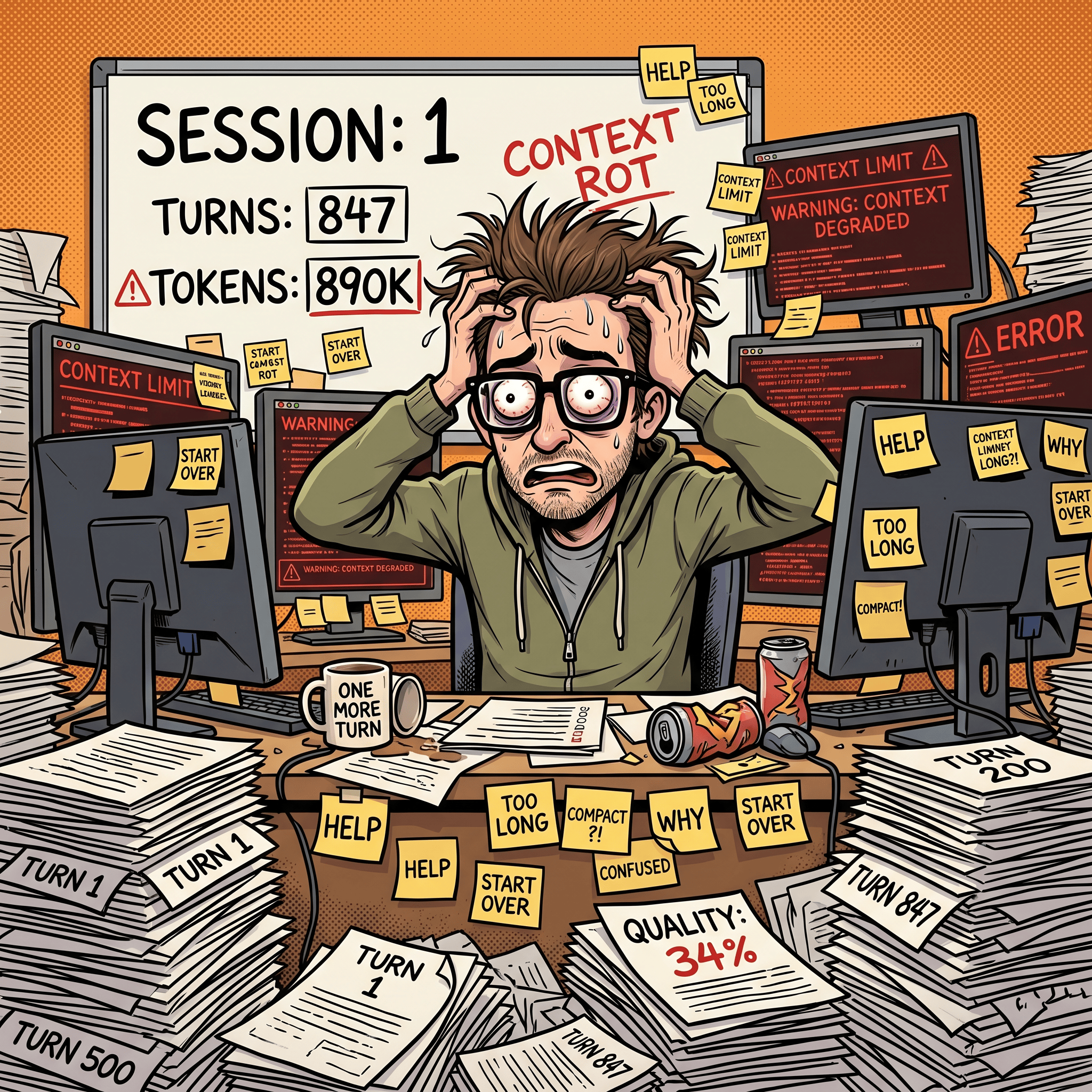
This is where context rot sets in. It’s not just about cost - it’s about quality degradation. As the context fills with stale information from earlier tasks, Claude starts making worse decisions.
Thariq from Anthropic confirmed publicly (also as a blog post) that context rot starts around 300-400K tokens. Not at the end of the 1M window. Not when compaction fires. At 300-400K. If you’re cramming multiple tasks into one session, you’re hitting the degradation zone far earlier than you think.
The symptoms are predictable: Claude suggests solutions you already rejected three tasks ago. It contradicts itself because it’s trying to reconcile constraints from Task A with requirements from Task C. It ignores things you told it explicitly because those instructions are now buried under hundreds of unrelated messages.
The insidious part: context rot is gradual. You don’t notice a cliff. You notice that Claude’s suggestions get slightly less accurate turn by turn. Each response is a little more generic, a little less aware of the specific state of your code. By the time you realize quality has degraded, you’ve already wasted 20-30 turns (and their associated tokens) getting subpar output.
Why auto-compacting doesn’t save you
Auto-compacting doesn’t fix context rot - it makes it worse in some ways. Here’s the critical detail from Thariq: the model is at its least intelligent when auto-compacting fires. Auto-compact triggers when context is nearly full, which means Claude is already suffering maximum context rot when it tries to summarize your session. It’s making decisions about what to keep and what to drop while at its lowest performance point.
Compacting summarizes, but summaries lose nuance. The summary of your bug fix still sits in context during your feature work, creating noise. And each compaction cycle means Claude’s understanding of the current task gets more diluted. You end up with a context that’s a muddy blend of compressed historical tasks rather than a clean focus on the current problem.
The token math
A session with 3 unrelated tasks crammed together might hit 200K context by the end. Three separate sessions of 60-70K each would have done the same work with less total context processed per turn, better cache hit rates (because each session has a stable prefix), and no cross-contamination between tasks.
On the Max plan, this habit also burns through your 5-hour rolling usage limit faster. Every turn processes the full bloated context, so you hit the limit in fewer turns than you would with clean, focused sessions.
The /resume trap
The same problem applies to --resume. People treat it as a way to “pick up where they left off,” but what they’re actually doing is loading a stale context with an expired cache. My session-metrics data shows these resumed sessions hit cache misses immediately - the entire context needs to be rebuilt from scratch because the cache TTL expired while you were away. You pay the full rebuild cost and inherit all the context rot from the previous session’s unrelated work.
Resume has legitimate uses: continuing a specific task you paused briefly (within the cache TTL window). But using it as a general-purpose “continue my day” command is just the single-session antipattern with extra steps.
The fix
New task, new session. Every time. This isn’t just my opinion - Thariq states it as Anthropic’s internal rule of thumb: “When you start a new task, you should also start a new session.”
The one exception: related follow-up tasks where context is still necessary. Writing documentation for a feature you just implemented is fine in the same session - Claude would have to re-read all those files anyway. But “build feature, then fix an unrelated bug, then document the feature” is not - the bug-fix context pollutes both phases.
The single biggest lever: plan mode
Most guides rank context management as the #1 positive habit. I did too, until I looked at my own data and realized plan mode is the root cause of my 97.5% cache hit rate. Context discipline maintains efficiency, but plan mode creates the conditions for caching to work in the first place.
The mechanism: how plan mode drives cache savings
When you start a session in plan mode and front-load your context (read the relevant files, establish the plan, define the constraints), that entire context gets written to cache once. Every subsequent execution turn reads from that cached prefix. The plan establishes a stable context pattern that rarely changes turn-to-turn, which is exactly what the cache system rewards.
Without plan mode, most people build context incrementally - read a file here, ask a question there, add a constraint after seeing bad output. That incremental approach means the cache prefix keeps changing, which means fewer cache hits and more expensive turns.
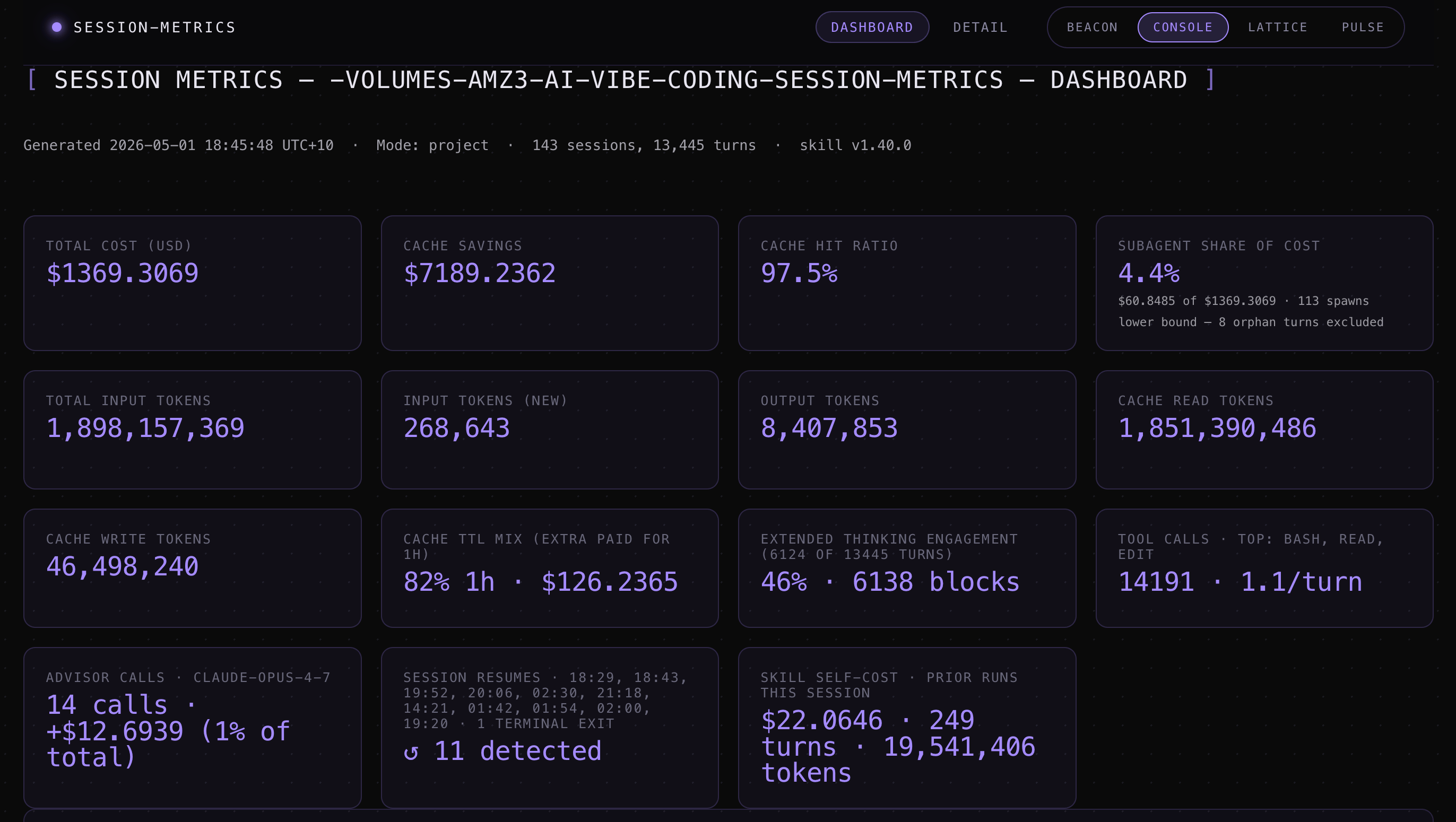
The numbers from my session-metrics data across 143 sessions and 13,445 turns on one project:
Cache hit rate: 97.5%
Actual cost: $1,369
Cost without cache: $8,558
Savings from cache: $7,189 (84% cost reduction, 6.3x multiplier)
Cache read-to-write ratio: 40:1
In one 507-turn session, my plan file was referenced 12 times and my main source file was read 200 times from turn 1 onwards. Because I established both during planning, they were cached from the beginning. The ratio of cache reads to fresh input in that session was 11,874:1.
My plan mode workflow
I never skip plan mode. Not for new features, not for bug fixes, not for refactors. Every task starts there. My standard plan-mode prompt includes something like: “Think critically and concisely. For all relevant tech and software used, look up Context7 MCP for the latest documentation and best practices. Also check the official docs for the tech stack to ground your understanding in current information.”
Why the documentation lookups? Because every AI model has a training cutoff - often 6 to 12 months out of date. If you let Claude plan a feature using its training knowledge alone, it might reference deprecated API flags, outdated config variables, or library versions that have breaking changes. I’ve seen this happen enough times that I now treat plan mode as a research phase, not just a thinking phase.
The workflow:
Enter plan mode (Opus)
Describe what I want built, with the instruction to verify against current docs using Context7 MCP and official sites’ documentation
Claude produces a plan grounded in the latest documentation it looked up
I review the plan, push back on anything that looks wrong or outdated
We iterate on the plan until I’m satisfied everything is current and correct
Only then do I approve execution
This back-and-forth costs relatively little. A few thousand tokens of planning and doc lookups. Compare that to building an entire feature on outdated assumptions, discovering it doesn’t work, and spending 3x the tokens to redo it.
In one project, Claude confidently planned a feature using a Remotion API method that had been renamed two versions ago. The Context7 lookup during planning caught the discrepancy immediately. Without it, I’d have burned 15-20 minutes debugging before realizing the plan itself was wrong. This applies to any fast-moving tech stack: Next.js, Tailwind, Docker, cloud provider APIs.
Front-load constraints, not just goals
Most prompts describe what to build. Better prompts also describe what not to do:
Add authentication using the existing JWT pattern in auth.ts.
No new dependencies. Follow the error handling pattern already in the codebase.
Use the UserRepository, don't query the database directly.
Constraints given upfront produce better first drafts than corrections given after the fact. Every correction round wastes context.

Context management: maintaining what plan mode creates
Plan mode sets up your cache. The habits below maintain it. The documented constraint from Anthropic’s best-practices page: “Most best practices are based on one constraint: Claude’s context window fills up fast, and performance degrades as it fills.”
/rewind: erase failed attempts instead of correcting
This is the most underused command in Claude Code. Thariq calls it the single best habit that signals good context management. Here’s why.
When Claude tries something and it doesn’t work, most people type “that didn’t work, try this instead.” That correction and Claude’s failed attempt both stay in your context permanently, adding noise to every future turn.
The better move: hit Esc Esc (or type /rewind) to jump back to before the failed attempt. Re-prompt with what you learned: “Don’t use approach A, the foo module doesn’t expose that - go straight to B.” The failed attempt is erased from context entirely.
A single failed approach might add 5-10K tokens of dead-weight context (Claude’s reasoning, the tool calls it made, the error output). Over a session with 3-4 wrong turns, that’s 20-40K tokens of noise that /rewind would have prevented.
I use rewind aggressively. If Claude’s first approach is clearly wrong within the first few tool calls, I rewind immediately rather than letting it finish. The moment I see it heading in the wrong direction, Esc Esc and re-prompt with a better constraint.
You can also use “summarize from here” before rewinding - Claude summarizes its learnings from the failed attempt, creating a handoff message to itself. Then you rewind and include that summary in your new prompt. You get the insight from the failed attempt without the context bloat.
/compact: proactive, not reactive
Most people hit /compact when Claude starts giving degraded responses. That’s too late - the model is already at its worst when compaction fires at high context usage.
The better habit: run /compact after completing a logical chunk of work. Finished a feature? Compact. About to start a new module? Compact. Guide what gets preserved:
/compact Focus on the API changes and the test failures we fixedWhen I’m running a multi-phase session where I need to carry context forward to the next task, I use:
/compact remember in detail context needed for next task(s)This tells the compaction to prioritize preserving the state, decisions, and constraints that the next phase needs - rather than just summarizing what happened. A generic compact might drop specific file paths or config values you’ll need next. Directing it to “remember in detail” keeps that operational context intact while still shedding the conversational noise.
You can also add a rule to your CLAUDE.md file like: “When compacting, always preserve the full list of modified files and any test commands.” This ensures critical context survives summarization.
There’s also a PostCompact hook to automatically re-inject specific context after every compaction:
{
  "hooks": {
    "SessionStart": [
      {
        "matcher": "compact",
        "hooks": [
          {
            "type": "command",
            "command": "echo 'Reminder: use Bun, not npm. Run bun test before committing.'"
          }
        ]
      }
    ]
  }
}
/compact vs /clear: know when to use which
These feel similar but behave differently:
/compact asks the model to summarize the conversation, then replaces history with that summary. It’s lossy - you’re trusting Claude to decide what mattered. You can steer it with instructions, but you can’t fully control what gets kept.
/clear wipes the slate. You write down what matters yourself: “we’re refactoring the auth middleware, the constraint is X, the files that matter are A and B, we’ve ruled out approach Y.” More work, but the resulting context is exactly what you decided was relevant.
After a focused session with a clear direction, /compact works well. After a messy debugging session with false starts, /clear with your own brief is safer because you know which dead ends to exclude.
Cache TTL and session rhythm
The cache TTL depends on your plan. The standard API tier gets a 5-minute ephemeral cache - step away for 10 minutes and the cache is gone. On the Max plan ($100/month), you get a 1-hour cache TTL.
My typical sessions run 5 to 12 hours continuous. I’m sending turns constantly, rarely leaving gaps longer than the 1-hour TTL. In 507 turns across one session, I had exactly one cache break - after a 512-minute idle gap (8.5 hours, overnight). Every normal working pause (testing manually, reading output, reviewing docs) stayed within the 1-hour window.
This rhythm matters: continuous sessions with plan-mode-established context is the ideal pattern for cache efficiency. If you work in short bursts with long gaps, you’ll hit cache rebuilds more often regardless of your plan tier. If you’re on the 5-minute TTL, any pause over 5 minutes forces a full rebuild - wrap up and commit before stepping away.
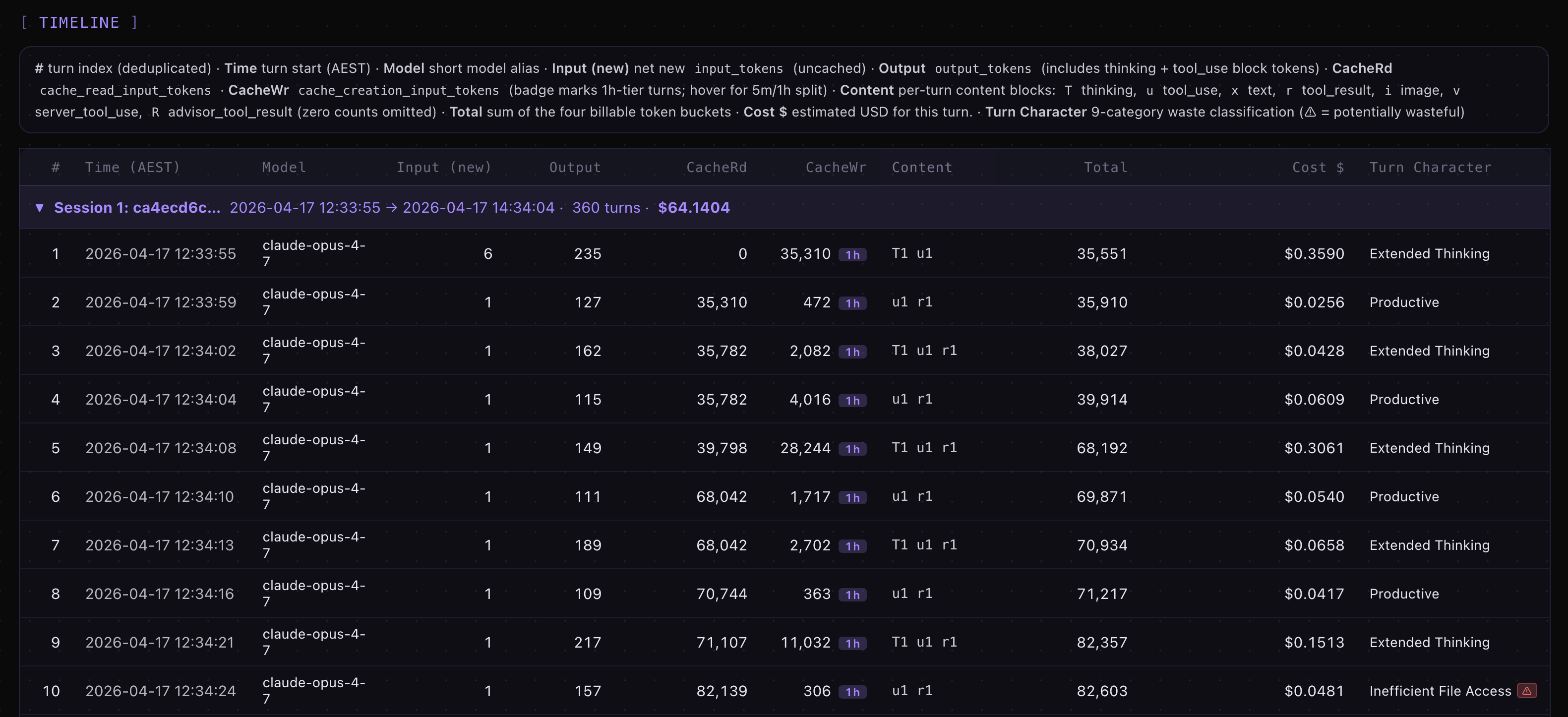
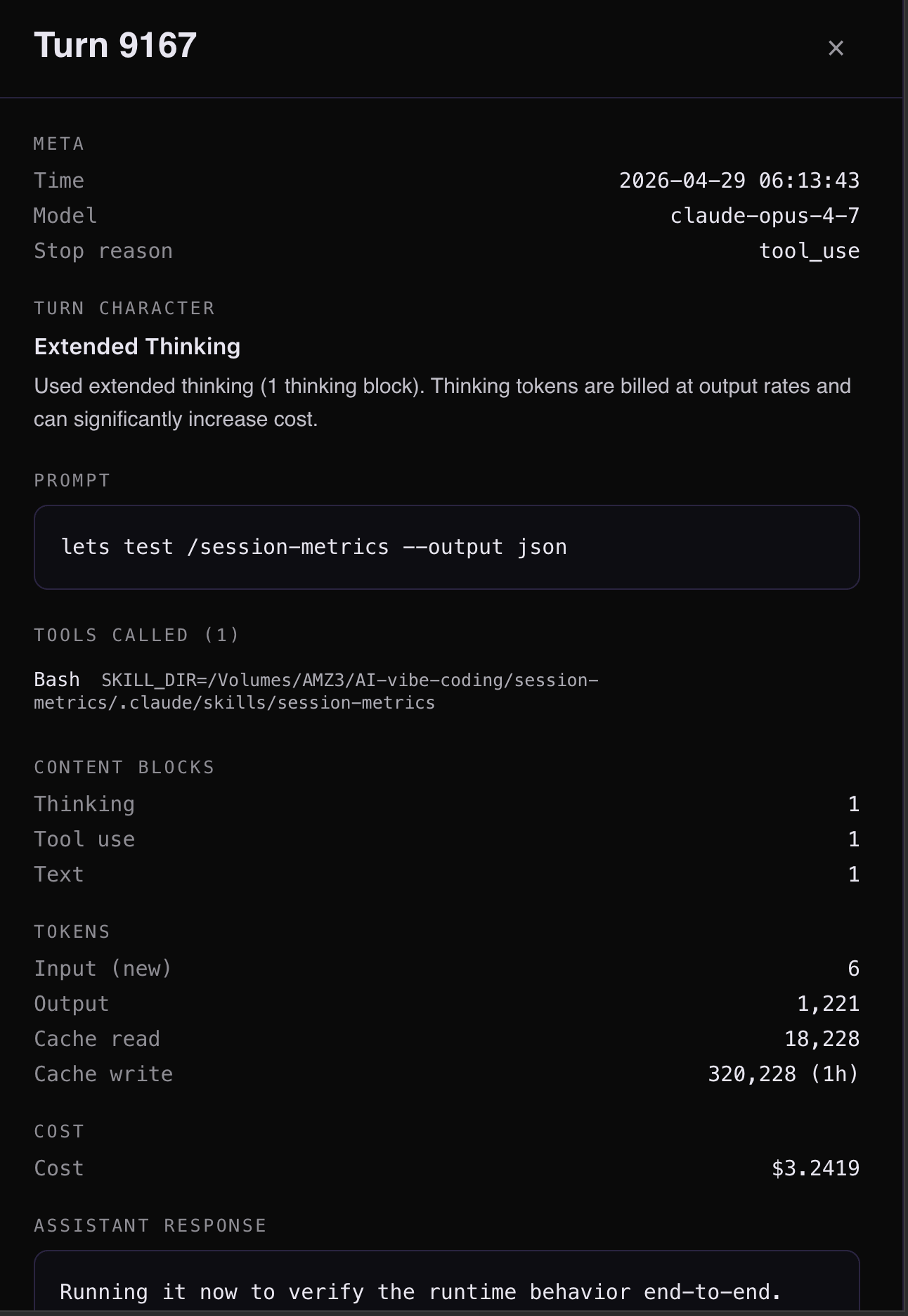
Over 143 sessions in this Claude Code project, I only had 25 token cache breaks according to my Claude Code session-metrics plugin exported HTML dashboard. For the highest cache break, it was related to start of a new session #109 for turn #9167 which is a normal expected cache break. The session-metrics plugin will allow you to pin-point where your cache breaks are.
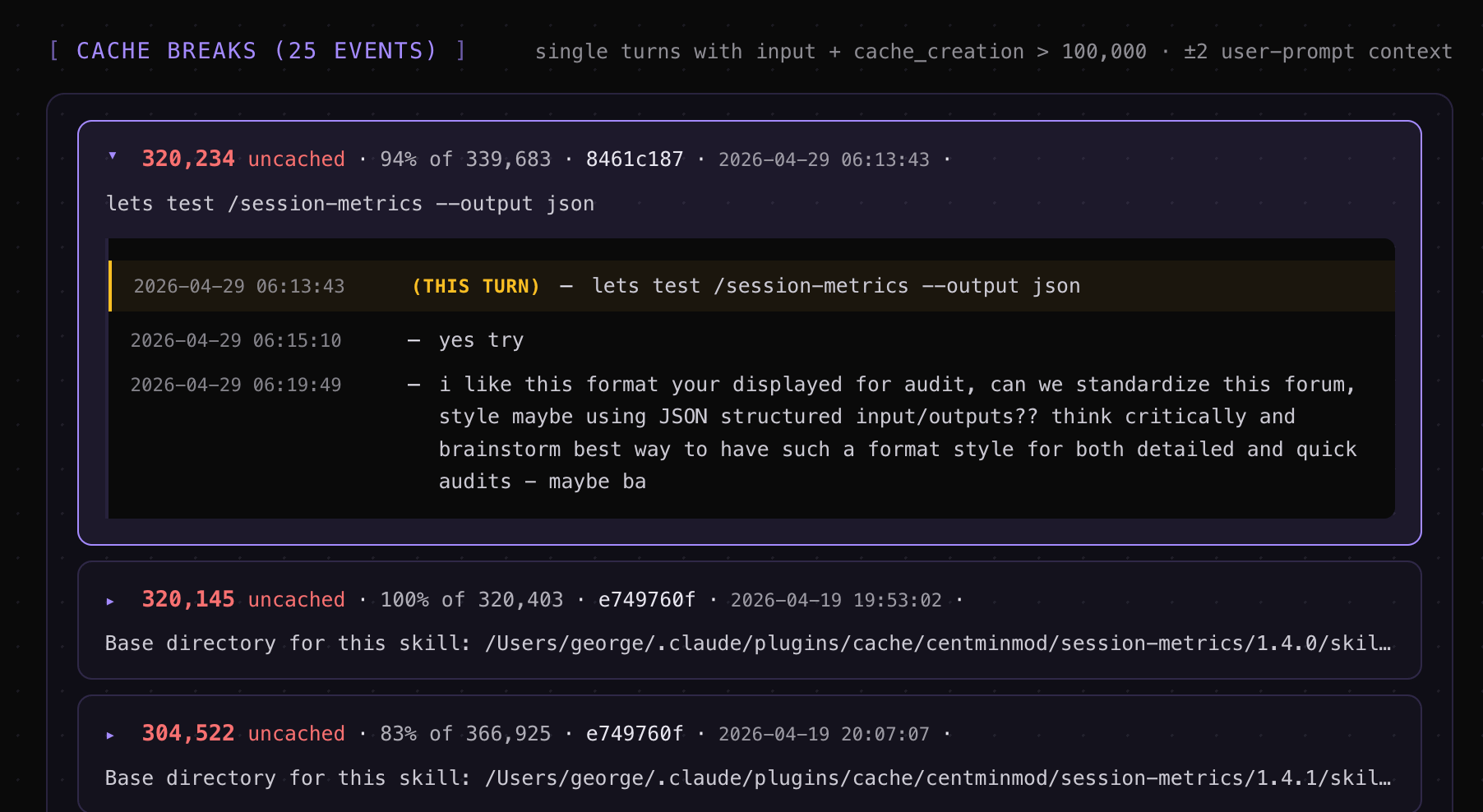

Clicking on turn #9167 in session #109 reveals insights.
Shift usage to off-peak hours
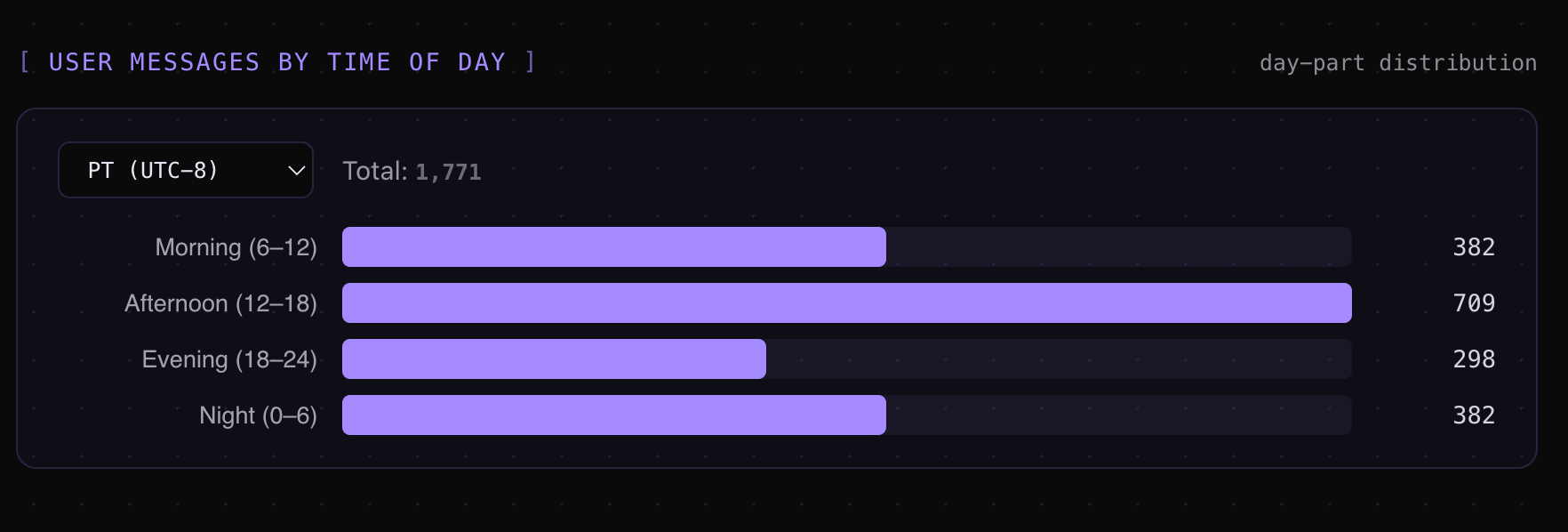
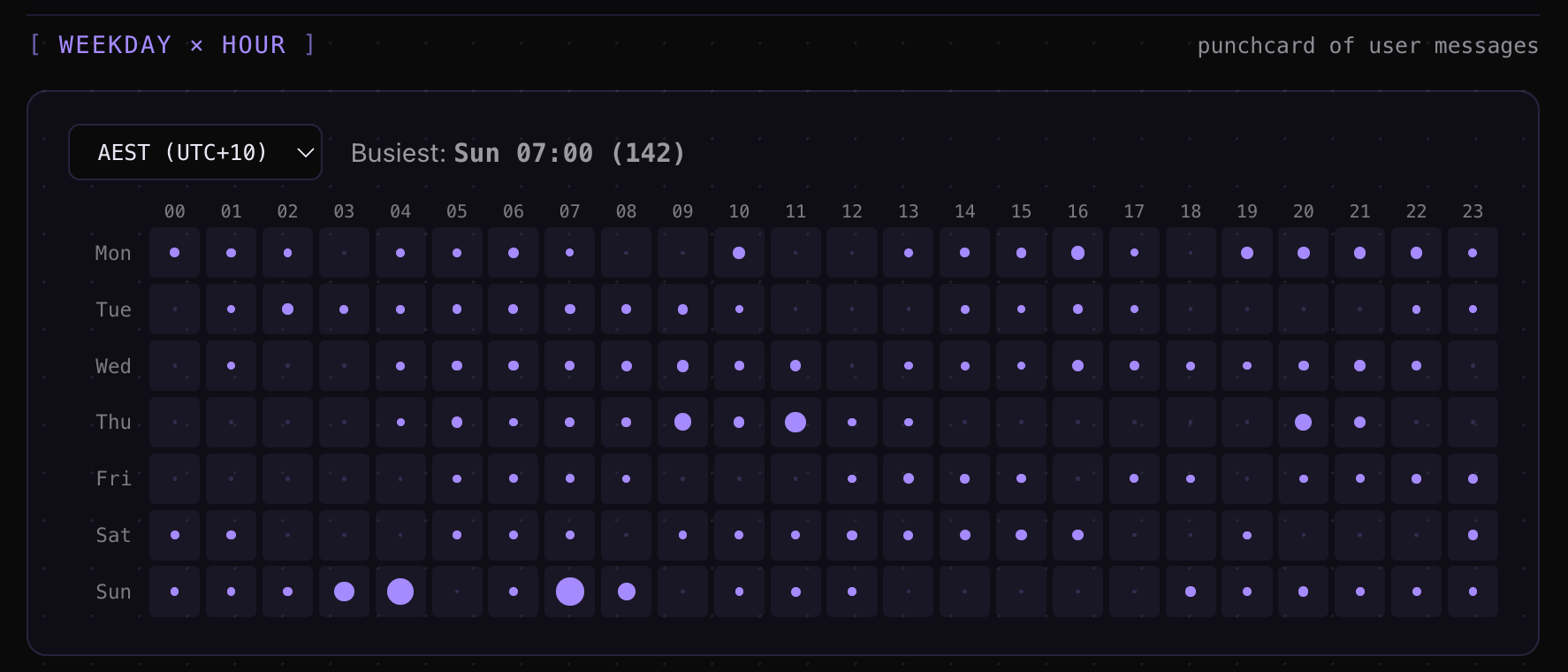
Update: May 7, 2026: Claude AI has removed peak hour reduced limits and doubled usage limits under an agreement to use SpaceX compute. With Opus 4.7, Anthropic reduced the 5-hour rolling usage limits during peak times. You can hit rate limits faster during peak hours (US Pacific time) even on paid plans during weekdays. Anthropic announced peak times as being between 5am–11am PT / 1pm–7pm GMT. I created my Timezones Scheduler app so I can figure out timezone conversions. Check it out at https://timezones.centminmod.com. I’ve moved most of my Claude Code work to off-peak hours - early mornings, evenings, and weekends in my timezone (AEST).
Thariq from Anthropic stated on Twitter:
To manage growing demand for Claude we're adjusting our 5 hour session limits for free/Pro/Max subs during peak hours. Your weekly limits remain unchanged.
During weekdays between 5am–11am PT / 1pm–7pm GMT, you'll move through your 5-hour session limits faster than before.
My session-metrics data confirms: 63% of my cost now happens outside business hours. Off-peak usage means fewer interruptions from throttling, longer unbroken sessions, and more consistent throughput. Combined with the 1-hour cache TTL, off-peak continuous sessions are the most efficient pattern I’ve found.
I wrote more about adapting to the Opus 4.7 changes (auto mode, recaps, the xhigh default) in my workflow tips article.
/btw for side questions
The /btw command lets you ask a quick question without it entering your conversation history. The answer appears in a dismissible overlay. You check a detail, it disappears, and your context stays clean.
Every question you ask normally adds both your message and Claude’s response to the context. Over a long session, those side questions accumulate. /btw eliminates that overhead for anything that’s informational rather than directional.
Sub-agents for heavy exploration
When Claude researches a codebase, it reads lots of files that consume your main context. Sub-agents run in their own context windows and report back summaries.
The mental test (from Thariq): “will I need this tool output again, or just the conclusion?” If you only need the conclusion, spin it off to a sub-agent. The intermediate output (50 file reads, debugging traces, exploration) stays in the sub-agent’s context and never pollutes yours.
Practical prompts that work:
“Spin up a subagent to read through this other codebase and summarize how it implemented the auth flow, then implement it yourself in the same way”
“Spin off a subagent to verify the result of this work based on the following spec file”
“Spin off a subagent to write the docs on this feature based on my git changes”
The effort knob: your biggest cost control
The /effort command sets how hard Claude thinks on each response. The levels are: low, medium, high, xhigh, and max. Most people never touch this, which means they’re paying max-effort prices for formatting fixes.
I measured this directly. In my Opus 4.6 vs 4.7 comparison, running the same 10 prompts at different effort levels showed Opus 4.7 at xhigh costs 2.17x more than Opus 4.6 at high. The newer model isn’t just more capable - it’s dramatically more expensive when you don’t control the effort level. Just adding the instruction to be ‘concise’ to Claude Opus 4.7 can reduce token usage by 29%!
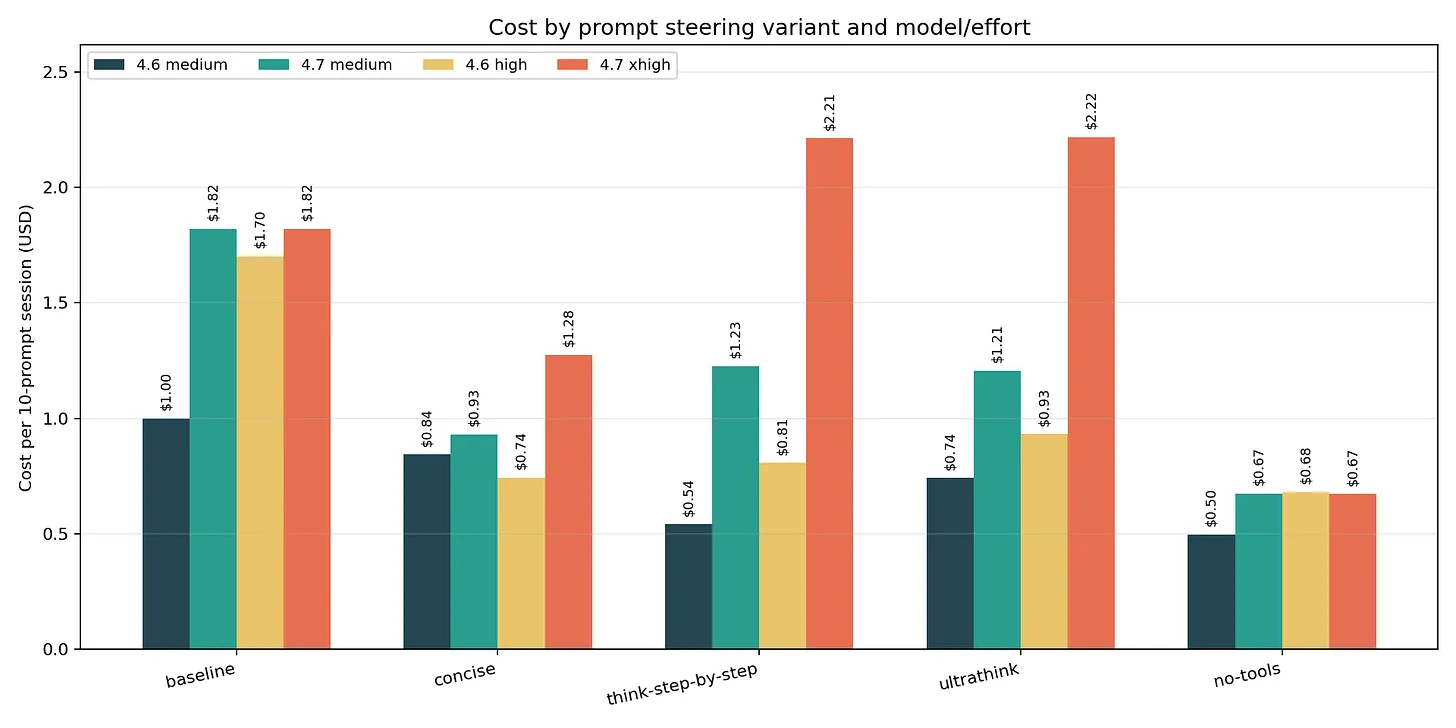
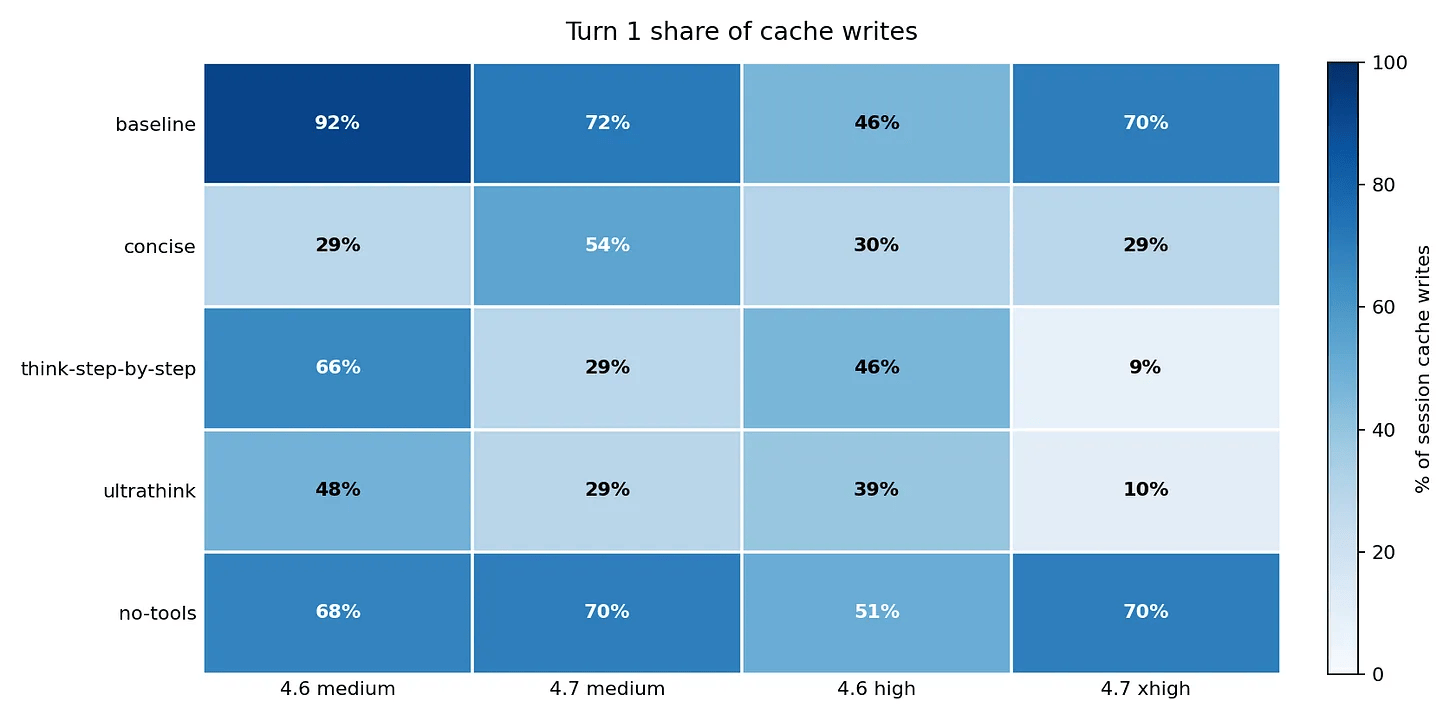
And prompting impacts on share of input token cache writes on Turn 1 in a session.
Match effort to task complexity
Low effort: typo fixes, simple renames, formatting changes
Medium effort: straightforward code changes with clear specs
High effort: multi-file features, refactoring with dependencies
xhigh/max effort: architecture decisions, complex debugging, algorithm design
Set this per-prompt (“use low effort for this”), per-session (/effort low), or globally via the CLAUDE_CODE_EFFORT_LEVEL environment variable.
In practice, most of my day is medium-effort work. I was defaulting to high for everything and paying roughly 40% more than I needed to. The moment I started explicitly downshifting to medium for routine work, my daily cost dropped noticeably without any quality impact.
Thinking keywords
Beyond /effort, you can use thinking keywords directly in your prompt: think, think hard, think harder, ultrathink. Each pushes Claude to use more extended reasoning tokens. Toggle thinking on/off mid-session with Option+T (Mac) or Alt+T, or limit the budget with MAX_THINKING_TOKENS.
Reserve ultrathink for problems where a mediocre answer costs you an hour of debugging. In my four-model benchmark, ultrathink on Opus 4.7 produced 606 tokens of thinking for a task with a 200-token output limit - and then violated the limit anyway. More thinking doesn’t always mean better instruction-following. Thinking tokens correlate with reasoning depth, not with compliance to explicit output rules.
The practical takeaway: think or think hard for moderately complex tasks. ultrathink only when the problem genuinely requires deep multi-step reasoning.
CLAUDE.md: write it once, benefit every session
CLAUDE.md is loaded into Claude’s context at the start of every session automatically. It’s the right place for anything you’d otherwise type repeatedly: build commands, code style rules, architecture constraints, project conventions.
The official guidance: “For each line, ask: ‘Would removing this cause Claude to make mistakes?’ If not, cut it.”
Keep it focused
A bloated CLAUDE.md dilutes your most important rules. Only include things specific to this codebase. If a rule applies to every project (“write tests”), it doesn’t belong. If a rule is specific (“all database queries go through the repository layer”), it does.
The docs warn: “If Claude keeps doing something you don’t want despite having a rule against it, the file is probably too long and the rule is getting lost.”
The multi-model caveat
One caveat on the “keep it lean” advice. That guidance assumes you only run Claude models. I also run ZAI GLM 5.1 inside Claude Code. GLM 5.1 is capable, but at the brevity level where Claude handles progressive disclosure well, GLM 5.1 hits maybe 80% instruction-following accuracy. To close that gap to 90-95%, I had to add more explicit steering and guardrails in my CLAUDE.md and SKILL.md files.
The unexpected side effect: those detailed instructions also appear to help Claude on days when developers report degraded Opus 4.6 performance. More explicit instructions leave less room for drift regardless of which model reads them. It’s a theory, but the correlation has been consistent enough that I trust it.
The real advice: keep CLAUDE.md as short as possible for the least capable model you run through it. If you only use Claude, lean is fine. If you run multiple models, the extra tokens may pay for themselves in consistency.
I wrote more about this in my session-metrics article.
I’ve now added DeepSeek V4 models to Claude Code usage mix too, so will see how this changes my CLAUDE.md.
File hierarchy and version control
Claude Code supports multiple CLAUDE.md files: ~/.claude/CLAUDE.md (global), ./CLAUDE.md (project root, check into git), ./CLAUDE.local.md (personal, gitignored), and subdirectory files for monorepo packages. Import other files with @path/to/file syntax to avoid duplicating content.
Commit your CLAUDE.md alongside the code changes that motivated it. Future team members benefit, and you can trace why certain rules exist.
Parallel development with worktrees
Git worktrees let you run multiple Claude Code sessions on separate branches simultaneously without conflicts.
claude --worktree feature-authEach worktree is an isolated working directory. Claude in one worktree doesn’t know or care what Claude in another is doing. I typically run two: one for the main feature I’m building, another for a review/test pass. The separation means the review session doesn’t have the implementation context biasing it toward approving code it “remembers” writing.
You can also have one Claude write tests first, then another write code to pass them. The separation of context prevents the second session from gaming the tests.
More slash commands worth knowing
/debug
When something isn’t working in your Claude Code session, /debug surfaces configuration issues, context problems, and tool availability without you having to diagnose manually.
/context
Shows everything loaded in your current context window: system prompt, memory files, skills, MCP tools, conversation messages. Use this first when Claude seems to be ignoring instructions - the issue is usually that a file didn’t load or got overridden.
/simplify
Claude tends to over-engineer. Ask for a data fetch and you might get a full abstraction layer with retry logic and caching. /simplify tells Claude to produce the simplest working version.
/batch
Groups multiple similar small requests into one efficient pass. Ten independent tasks (fix a typo, rename a variable, add a comment) batched together beats ten separate sessions.
Non-interactive mode for automation
With claude -p "your prompt", you run Claude without a terminal session - useful for CI pipelines, pre-commit hooks, or automated workflows. Add --output-format json for structured output or --bare for minimal mode that skips auto-discovery.
All 220 sessions in my effort benchmark were claude -p calls with structured JSON output, piped into my session-metrics analysis pipeline. It’s the only way to run controlled experiments at that scale.
MCP servers: the hidden context tax
Every MCP server you have enabled gets its tool descriptions included in Claude’s context on every request. In sessions with 8+ MCP servers connected, I consistently see 15-20% more base context consumption before I even send my first message.
The practical fix: audit your MCP server list periodically. If you haven’t used a server in the last week, disable it. The context savings compound across every message in every session.
The docs recommend CLI tools as “the most context-efficient way to interact with external services.” The gh CLI, for instance, adds zero context overhead until you invoke it. An MCP server adds overhead to every turn whether you use it or not.
Verification: let Claude check its own work
The official docs state it plainly: “If you can’t verify it, don’t ship it.”
Always give Claude a way to confirm correctness - run tests, compare screenshots, validate output formats. I structure prompts to include verification: “Implement this feature, then run the test suite and fix anything that fails.” Slightly more tokens per turn, dramatically fewer correction cycles overall.
What I measured across 220 sessions
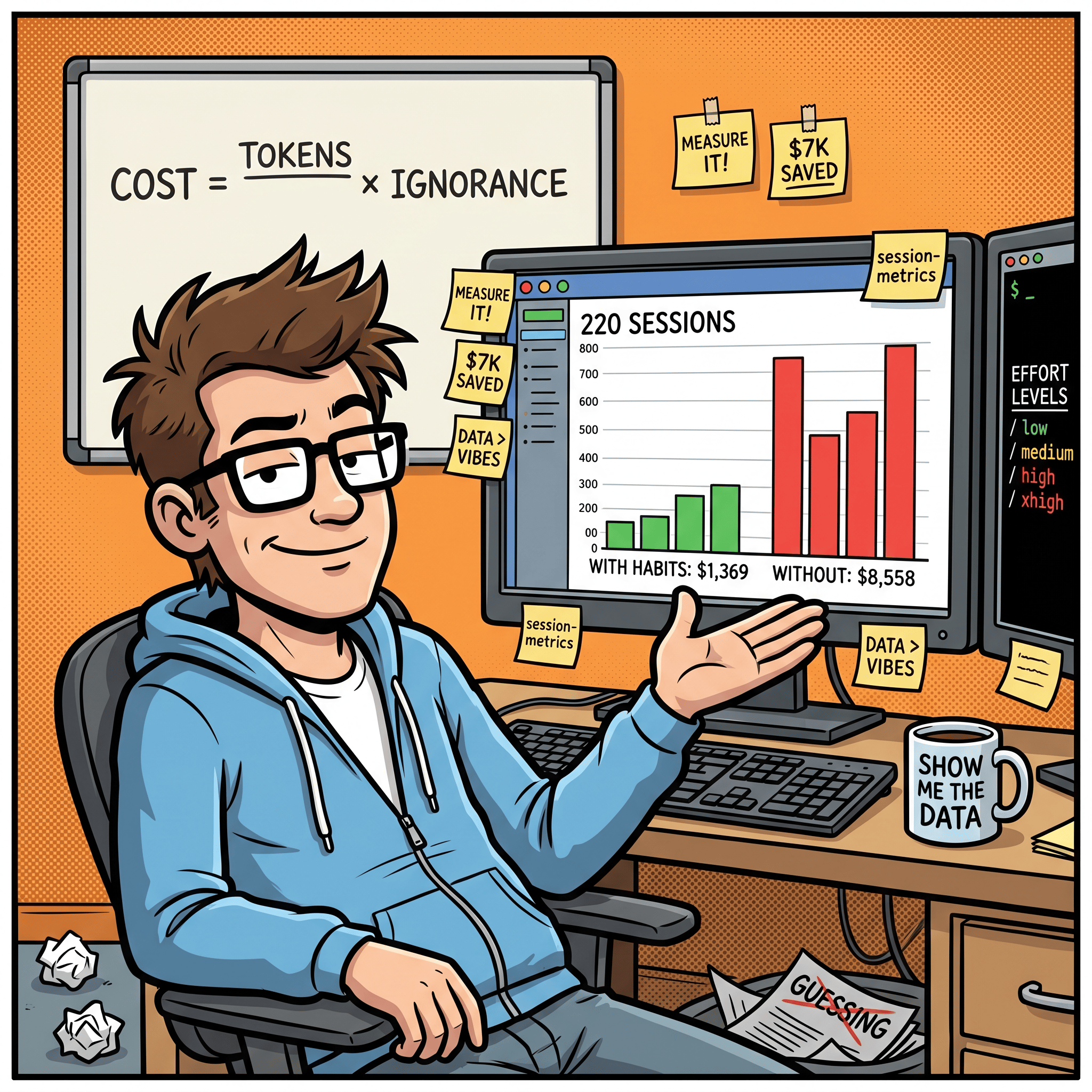
In my four-model effort benchmark, I ran 220 Claude Code subprocess sessions across Opus 4.7, Opus 4.6, Opus 4.5, and Sonnet 4.6 at every effort level. The data revealed patterns that aren’t intuitive:
Sonnet 4.6 delivers 15,516 tokens per dollar. Opus 4.7 delivers 3,015. That’s a 5x efficiency gap. For tasks that don’t need Opus-level reasoning, you’re paying 5x more for marginal quality improvements.
Cache hits are the real cost lever. Sessions that achieved warm cache (98%+ hit rate) cost 40-60% less than cold starts with identical prompts.
One sentence in a prompt cut my bill 63%. In my Opus 4.6 vs 4.7 comparison, adding a no-tools constraint to prompts reduced cost by 63% on Opus 4.7. But it also broke instruction-following on 2 of 9 test prompts. Cost savings and correctness don’t always move in the same direction. You have to measure both.
Model choice matters more than most optimizations. Opus 4.6 held 9/9 instruction-following across all five prompt variants I tested. Opus 4.7 scored 6/9 on the no-tools variant. The newer model isn’t automatically better - the “best” model depends on what you’re optimizing for.
The effort knob has diminishing returns. Going from medium to high produces meaningful quality improvements. High to xhigh or max often adds cost without proportional gains unless the task is architecturally complex.
The habits that compound
After hundreds of measured sessions, here’s my ranked list of what actually changes your Claude Code economics:
New session for new tasks. The single biggest waste is cramming unrelated work into one session. Context rot starts at 300-400K tokens.
Always start with plan mode. Front-load context, verify against current docs, establish the cache prefix that saves money on every subsequent turn.
Rewind instead of correcting. Failed attempts add permanent noise. Erase them with
Esc Esc.Match effort to task. Low effort for simple changes. Reserve xhigh/ultrathink for genuine complexity.
Compact proactively with instructions. At logical breakpoints, not when quality degrades. Tell it what to remember.
Shift usage to off-peak hours. Avoid throttling, get longer unbroken sessions.
Keep CLAUDE.md lean (for your least capable model). Every line should prevent a specific mistake.
Use /btw for side questions. Keep informational queries out of your conversation history.
Disable unused MCP servers. Free context savings on every turn.
Use sub-agents for exploration. Keep heavy file reads out of your main context.
Track your costs. You can’t optimize what you don’t measure.
That last point is why I built the Claude Code session-metrics plugin. I couldn’t find these patterns without instrumenting my sessions. The token counts, cache rates, and cost-per-turn data told me things that no amount of casual observation would have surfaced. Check out my Claude Code session-metrics plugin if you want to dig into your Claude Code token usage and usage profiles at individual session level, project level or entire Claude Code instance level.
What’s next
I’m continuing to benchmark new Claude Code releases as they ship. Every model update changes the cost curve, and the effort levels don’t behave identically across model versions. If you want to see the raw data behind these recommendations, the full benchmark results with 12 cross-model charts are in my effort benchmark article.
If you’re building with AI and want practical, measured insights instead of hype, subscribe for future posts. You can also follow my shorter updates on Threads (@george_sl_liu) and Bluesky (@georgesl.bsky.social).