
How To Get a Second AI Opinion in Claude Code With Codex CLI and GLM
Claude Code skills to get a second opinion from Codex CLI GPT-5.4 and Z.AI GLM-5

Two skills, two external models, one unified analysis. Here is how I set up consult-codex and consult-zai to cross-check Claude Code’s work with OpenAI Codex and z.ai’s glm-4.7, glm-5, glm-5.1.
The problem with single-AI code analysis
When Claude Code is the only AI looking at your code, you get one perspective. That is usually fine for routine tasks. But for complex refactors, security-sensitive changes, or architecture decisions, a single perspective has blind spots. I found this the hard way when building Timezone Scheduler – Claude Code missed encoding edge cases that a second AI flagged immediately.
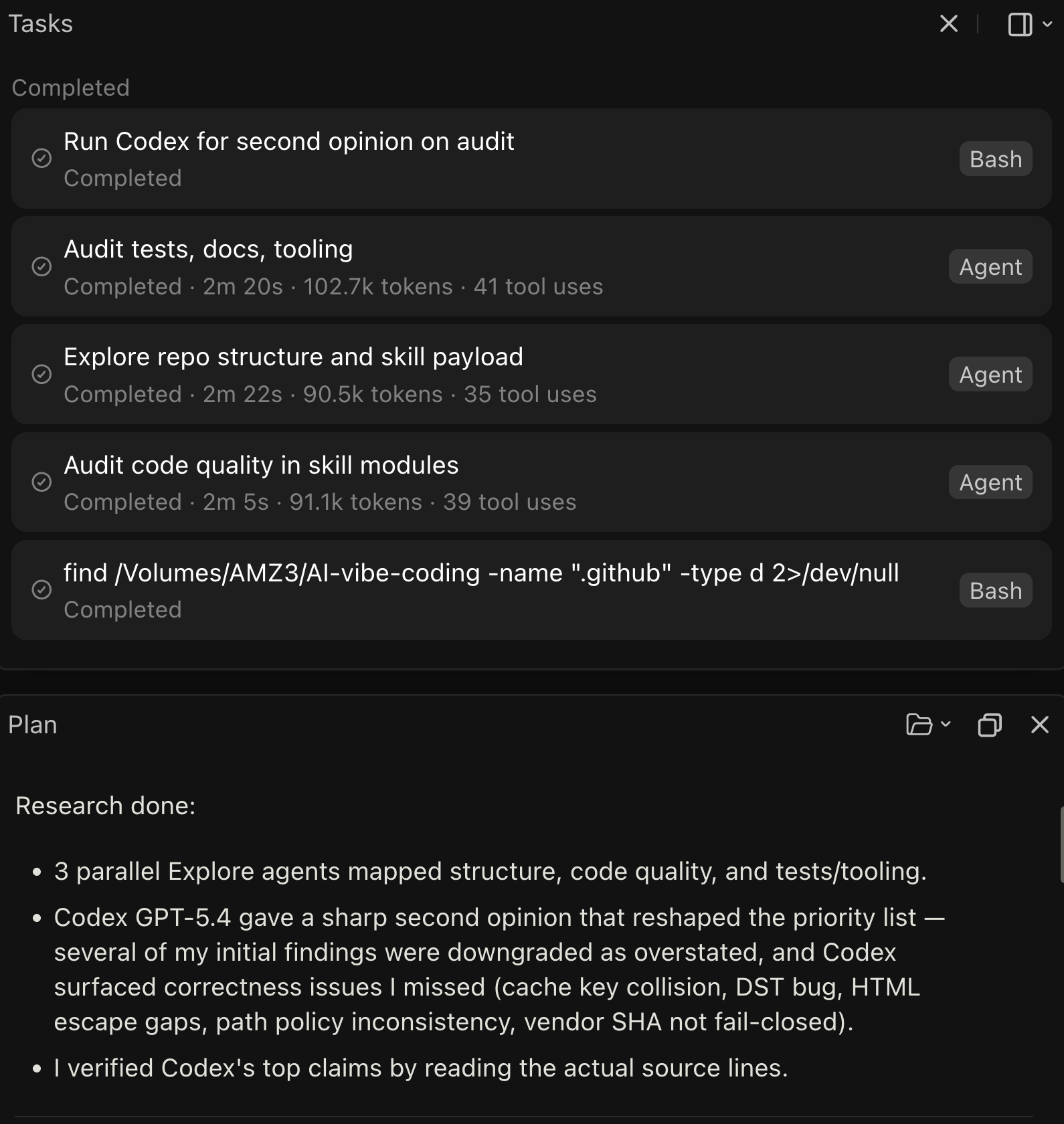
So I used my custom Claude Code skills that let me ask a question once and get parallel answers from two different AI models, with a structured comparison at the end. No copy-pasting between tools, no switching browser tabs. Just type /consult-codex or /consult-zai and both AIs work simultaneously. I’ve been using skills within Claude Code for the past 3 months with great success. I also created a Codex CLI MCP bridge for use within Claude Desktop on MacOS and it’s isolated sandbox.
What the skills do
consult-codex pairs a custom code-searcher subagent (from my GitHub starter template repository) with OpenAI’s Codex (GPT-5.4) running in readonly mode. consult-zai pairs the same code-searcher with z.ai’s glm-4.7. Both follow the same pattern:
You ask a code question
The skill wraps your question with structured output requirements (file paths with line numbers, confidence levels, limitations)
Both AIs run in parallel – no serial waiting
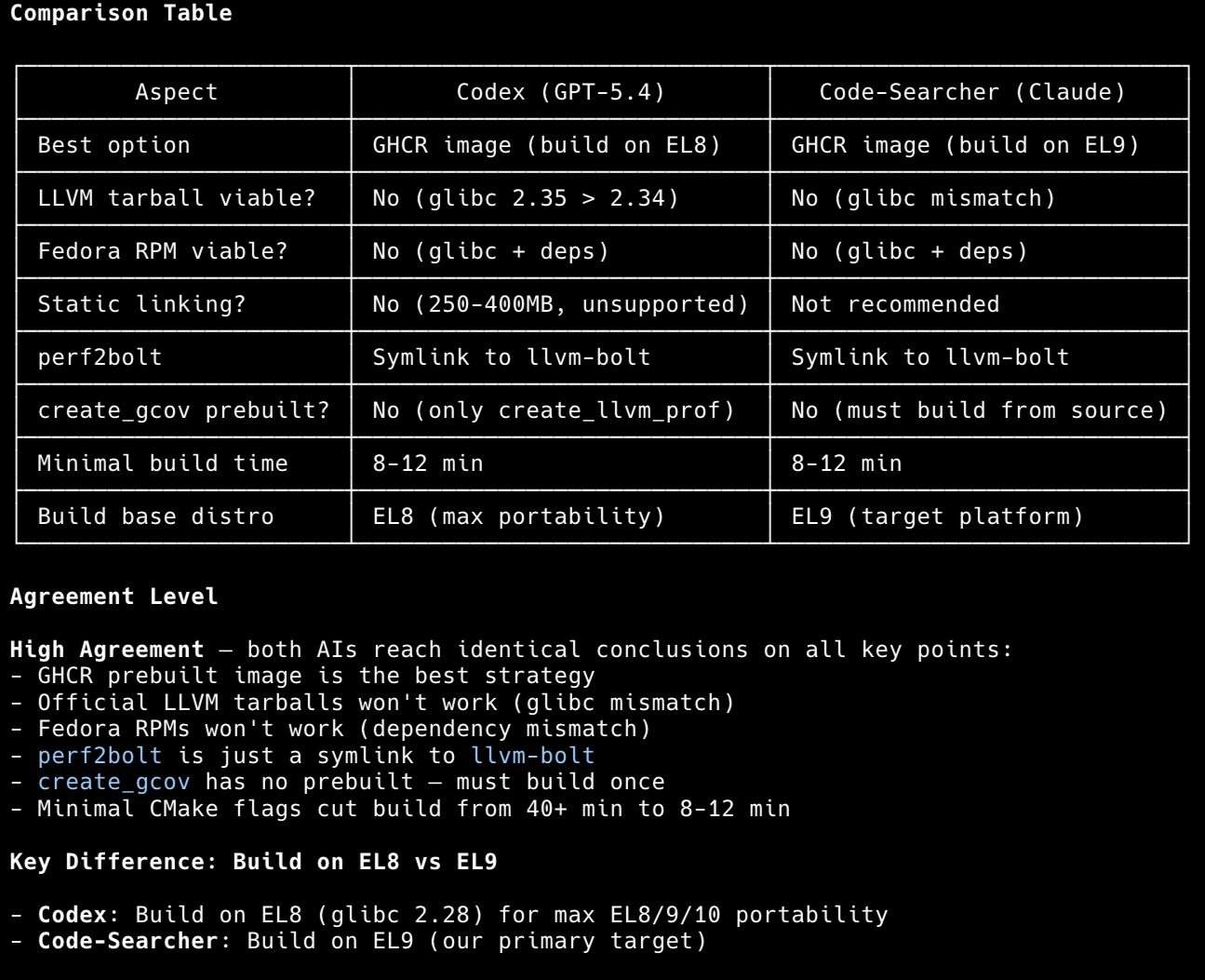
You get a side-by-side comparison table showing where they agree, where they diverge, and which source provided better evidence
The comparison output includes an agreement level indicator: High Agreement (both reached similar conclusions, higher confidence), Partial Agreement (overlapping findings with unique additions from each), or Disagreement (contradicting findings, manual verification needed).
In practice, I use consult-codex most often for security reviews and large commits. During the Timezone Scheduler build, a Day 3 API commit spanning 837 lines went through dual analysis. Codex caught request limit concerns that Claude alone did not flag, while the code-searcher agent found a caching optimization that Codex overlooked. Neither AI alone would have produced the same result.
Prerequisites
Before setting up these skills, you need three things installed and working.
1. Claude Code
Install Claude Code if you have not already. Use whichever package manager you have:
# npm
npm install -g @anthropic-ai/claude-code

# bun
bun install -g @anthropic-ai/claude-code
Verify it works: claude --version
2. OpenAI Codex CLI (for consult-codex)
Install the Codex CLI globally:
npm install -g @openai/codexAuthenticate with your OpenAI API key or login to your OpenAI ChatGPT subscription:
export OPENAI_API_KEY="your-openai-api-key"Add that export to your ~/.bashrc or ~/.zshrc so it persists. Verify it works: codex --help
3. Z.AI GLM Coding Plan (for consult-zai)
Z.AI provides access to glm-4.7 through a Claude Code-compatible API. It is a subscription service starting at roughly $3/month for the Lite plan (~120 prompts per 5 hours), with Pro (~600 prompts) and Max (~2,400 prompts) tiers available.
Prerequisites: Node.js 18 or newer and a Z.AI API key from z.ai.
The zai alias is a shell function that sets environment variables and launches Claude Code pointed at z.ai’s API endpoint. Add this to your ~/.bashrc or ~/.zshrc:
zai() {
    export ANTHROPIC_AUTH_TOKEN="your-zai-api-key"
    export ANTHROPIC_BASE_URL="https://api.z.ai/api/anthropic"
    export API_TIMEOUT_MS="3000000"
    claude "$@"
}
Reload your shell (source ~/.bashrc) and verify: zai --version should show the Claude Code version, confirming the alias works.
For Windows PowerShell:
function zai {
    $env:ANTHROPIC_AUTH_TOKEN = "your-zai-api-key"
    $env:ANTHROPIC_BASE_URL = "https://api.z.ai/api/anthropic"
    $env:API_TIMEOUT_MS = "3000000"
    claude $args
}
By default, Z.AI maps Claude model names to GLM models automatically: Opus and Sonnet map to glm-4.7, Haiku maps to glm-4.5-air. You do not need to configure model names manually.
If you want to override and pin to a specific model – for example to try newer releases – add the model env vars to the function:
zai() {
    export ANTHROPIC_AUTH_TOKEN="your-zai-api-key"
    export ANTHROPIC_BASE_URL="https://api.z.ai/api/anthropic"
    export API_TIMEOUT_MS="3000000"
    export ANTHROPIC_DEFAULT_OPUS_MODEL="glm-5"
    export ANTHROPIC_DEFAULT_SONNET_MODEL="glm-5-turbo"
    export ANTHROPIC_DEFAULT_HAIKU_MODEL="glm-4.5-air"
    claude "$@"
}
Available GLM models at time of writing: glm-4.7, glm-5, glm-5-turbo, glm-5.1. Leaving the overrides out lets Z.AI update the mapping automatically as new models release, so only pin if you have a specific reason to.
For privacy: Z.AI states it does not store any content you provide or generate. All services are based in Singapore. See their privacy policy for details.
Setting up the skills
Both skills live in your project’s .claude/skills/ directory. You can grab them from my Claude Code starter template, which is publicly available and includes these skills plus additional agents and workflow tooling.
Skill file structure
.claude/
  skills/
    consult-codex/
      SKILL.md
    consult-zai/
      SKILL.md
  agents/
    codex-cli.md
    zai-cli.md
    code-searcher.md
Each skill has a single SKILL.md file that tells Claude Code when and how to use it. The agents directory contains the CLI wrapper definitions that the skills invoke.
How consult-codex works internally
When you run /consult-codex "analyze the auth middleware for security issues", the skill:
Wraps your question with structured output requirements – it asks both AIs for summaries, key findings with
file:linecitations, confidence levels, and acknowledged limitationsWrites a temp file (
$CLAUDE_PROJECT_DIR/tmp/codex-prompt.txt) to avoid shell quoting issues with complex promptsLaunches both AIs in parallel using a single message with multiple tool calls:
Codex runs via:
bash -i -c 'codex -p readonly exec "$(cat $CLAUDE_PROJECT_DIR/tmp/codex-prompt.txt)" --json 2>&1'code-searcher runs as a custom Claude Code subagent (defined in
.claude/agents/code-searcher.mdin the starter template)Parses Codex JSON output using jq recipes to extract reasoning, agent messages, and command executions from the JSONL stream
Cleans up the temp file, then builds the comparison table
The readonly permission mode for Codex is important – it can read your codebase but cannot modify files, which keeps the consultation safe.
How consult-zai works internally
The consult-zai skill follows the same architecture but calls the z.ai CLI instead:
bash -i -c 'zai -p "$(cat $CLAUDE_PROJECT_DIR/tmp/zai-prompt.txt)" --output-format json --append-system-prompt "You are GLM 4.7 model accessed via z.ai API." 2>&1'The --append-system-prompt flag tells the model its identity, which helps when the comparison table attributes findings to each source.
The comparison output
Both skills produce a structured comparison with:
Raw responses from each AI
A table comparing file paths found, line number specificity, code snippet quality, unique findings, and accuracy
An agreement level assessment
A synthesized summary that prioritizes findings corroborated by both agents
A recommendation on which source was more helpful for that specific query
What I learned
Parallel execution matters. Running both AIs simultaneously instead of sequentially cuts total wait time roughly in half. The skill architecture launches both as concurrent tool calls in a single message.
Structured prompts produce comparable output. Without the enhanced prompt wrapper, each AI returns answers in different formats, making comparison difficult. Requiring file:line citations and confidence levels from both makes the comparison table meaningful.
Agreement level is a useful signal. When both AIs agree, I have higher confidence. When they disagree, that is exactly where I should look manually. Partial agreement – where each found something the other missed – is the most common and most valuable outcome.
The temp file pattern solves a real problem. Shell quoting breaks when your prompt contains quotes, backticks, or special characters. Writing to a temp file and reading with $(cat ...) avoids all of that.
What did not work
The initial version tried to pass prompts directly as shell arguments. That broke constantly with complex code questions containing special characters. The temp file approach was the fix.
Codex CLI can be slow to respond – sometimes over a minute for large codebase scans. The skill sets a 10-minute timeout to handle this, but it means you should not expect instant results on complex queries. You may find that Claude response will complete before the Codex CLI response. In which case you can prompt Claude to take into account Codex CLI’s response.
Z.AI’s token limits on the Lite plan can be constraining for large analysis tasks. If you plan to use consult-zai heavily, the Pro tier is worth considering.
What is next
These skills are part of my Claude Code starter template, which includes the full setup: skills, agents, memory bank system, shell aliases, git worktree launchers, and more. I will cover the complete template in a dedicated post.
If you want to try these skills today, clone the starter template repo and copy the .claude/skills/consult-codex/ and .claude/skills/consult-zai/ directories into your own project. Make sure you also grab the agent definitions from .claude/agents/.
If you’re interested in practical AI building for web apps, developer workflows, and infrastructure, subscribe for future posts. You can also follow my shorter updates on Threads (@george_sl_liu) and Bluesky (@georgesl.bsky.social) or subscribe and follow along.