

If you have ever scheduled a meeting across three continents, you know the math. You check one timezone converter, then another, then you do the offset arithmetic in your head, and somewhere in the process you forget that New York already switched to daylight saving but London has not yet.
I do consulting work across Brisbane, the US, and Europe and it can be a challenge to find a time that works for all folks. So I built a tool with Claude Code (Anthropic’s AI coding agent that writes and runs code from natural language instructions) to handle it - with both a graphical user web interface as well as command line / API support. Then, out of curiosity, I gave 11 AI models the same timezone scheduling problem my tool solves. The best model scored 86 out of 100. My tool scored 100.
This is not about AI being bad at timezone math. It is about recognizing when a purpose-built tool outperforms general-purpose AI, and what builders can learn from that gap.
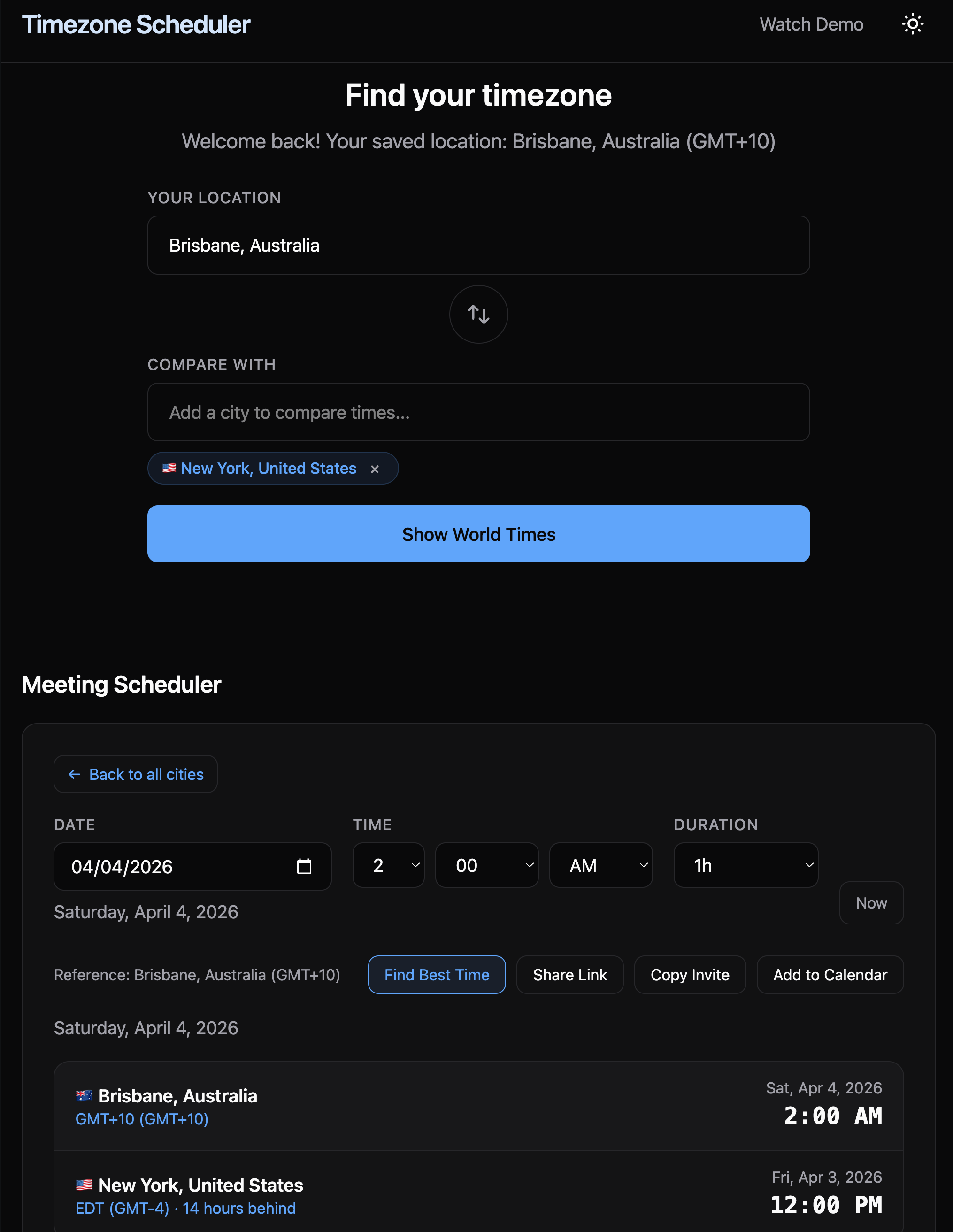
Timezones Scheduler web app interface at https://timezones.centminmod.com.
Same prompt, 11 models, one rubric
I gave every model the same prompt for March 23, 2026:
“Find the most optimal meeting time that works across Brisbane, New York, and London, ideally falling within business hours for all three cities, or as close to business hours as possible.”
Here is the constraint that makes this hard: Brisbane is 14 hours ahead of New York. When it is 9 AM Monday in New York, it is 11 PM Monday in Brisbane. Getting all three cities into standard business hours simultaneously is mathematically impossible. The best any solution can do is land two cities in core business hours and one outside, which I score as 6 out of a possible 9 points (more on the scoring system below).
I scored every response across five categories totalling 100 points: time optimization (25), DST accuracy (20), timezone math consistency (15), analysis quality (20), and practical value (20).
Only 2 out of 11 models found the optimal time slot.
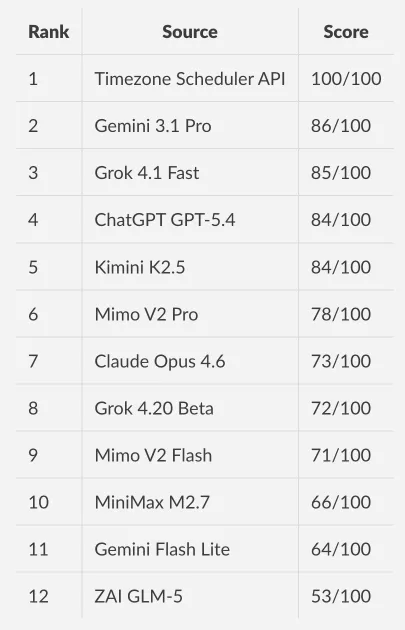
Full benchmark with every model’s raw response: github.com/centminmod/timezone-scheduler
Why AI struggles with this
Three patterns stood out across the 11 models I tested:
Models contradict their own analysis. MiniMax M2.7 recommended 5:00 AM New York, then labeled it “too early” in the same response. Gemini 3.1 Pro found the optimal slot in its ranked list, then recommended a different, worse time in its summary paragraph. When models reason through trade-offs, they sometimes lose track of their own conclusions. You have probably seen this yourself: an AI gives you a great answer, then undermines it two paragraphs later.
Models do not check every option. My tool evaluates all 24 hours across every timezone combination. Models pick a “reasonable” slot based on reasoning, which usually means they settle for a good-enough answer instead of finding the best one. Only 2 out of 11 models found the optimal slot.
Daylight saving transitions are a trap. March 23, 2026 falls six days before London switches from GMT to British Summer Time. One model, ZAI GLM-5, assumed London was already in BST. That one-hour error cascaded through every time it calculated, dropping its score to 53. If you have ever shown up an hour early or late to a meeting after a clock change, you know the feeling. AI models make the same mistake.
What the tool does differently
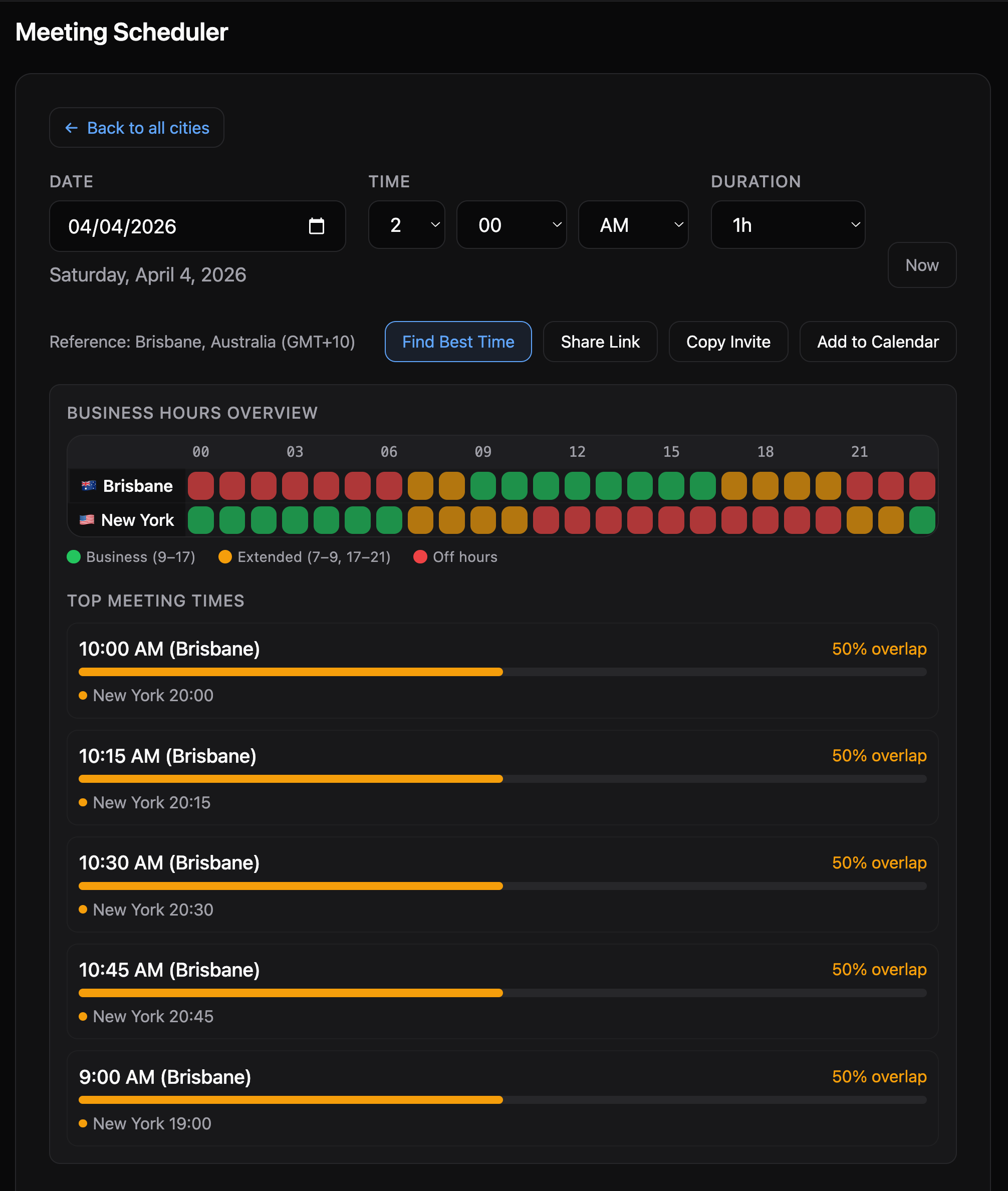
The Timezone Scheduler takes a computational approach. It evaluates every hour of the day across all participant timezones. Business hours (9 AM to 5 PM) score 3 points per participant. Extended hours (7-9 AM or 5-9 PM) score 1 point. Off hours score zero.
When multiple slots tie on business-hours score, a comfort tie-breaker kicks in. The idea is simple: 3 AM is the worst possible meeting time for anyone. The tool measures how far the worst-off participant is from 3 AM. The farther from 3 AM, the better. This is why the tool picks 11 PM Brisbane over midnight Brisbane. Both score 6/9, but 11 PM is farther from “miserable o’clock” and therefore a more civil hour.
The tool evaluates every possible slot deterministically. It does not reason about trade-offs and drift toward a plausible answer. It scores them all and returns the best one.
How it is built
If you are not a developer, here is the short version: the tool runs entirely in the cloud on Cloudflare’s edge network, loads fast anywhere in the world, and uses the browser’s own built-in timezone data instead of relying on third-party libraries. The technical details follow for those who want them.
The architecture is deliberately simple. A Cloudflare Worker (a serverless function that runs at the network edge, close to users) handles all API logic in TypeScript. The frontend is vanilla JavaScript with no framework, styled with Tailwind CSS v4, and bundled by Vite. No React, no Vue, no Angular. For a tool this focused, a framework would add complexity without adding value.
Browser (Vanilla JS)              Cloudflare Worker (TypeScript)
--------------------              --------------------------------
app.js      (orchestrator)        GET      /api/timezone-data
timezone-data.js (Intl utils)     GET      /api/search
map.js      (SVG world map)       GET|POST /schedule/api  (schedule|suggest|search)
scheduler.js (meeting grid)       GET      /schedule/api/schema  (OpenAPI 3.1)
styles.css  (Tailwind v4)         GET|POST /schedule/api/mcp  (MCP server)
Zero external timezone libraries. The browser’s native Intl.DateTimeFormat API handles everything: offset calculations, daylight saving transitions, locale-aware formatting. This matters because the timezone data comes from the same database your operating system uses, so it is always up to date without needing to ship or maintain a separate library.
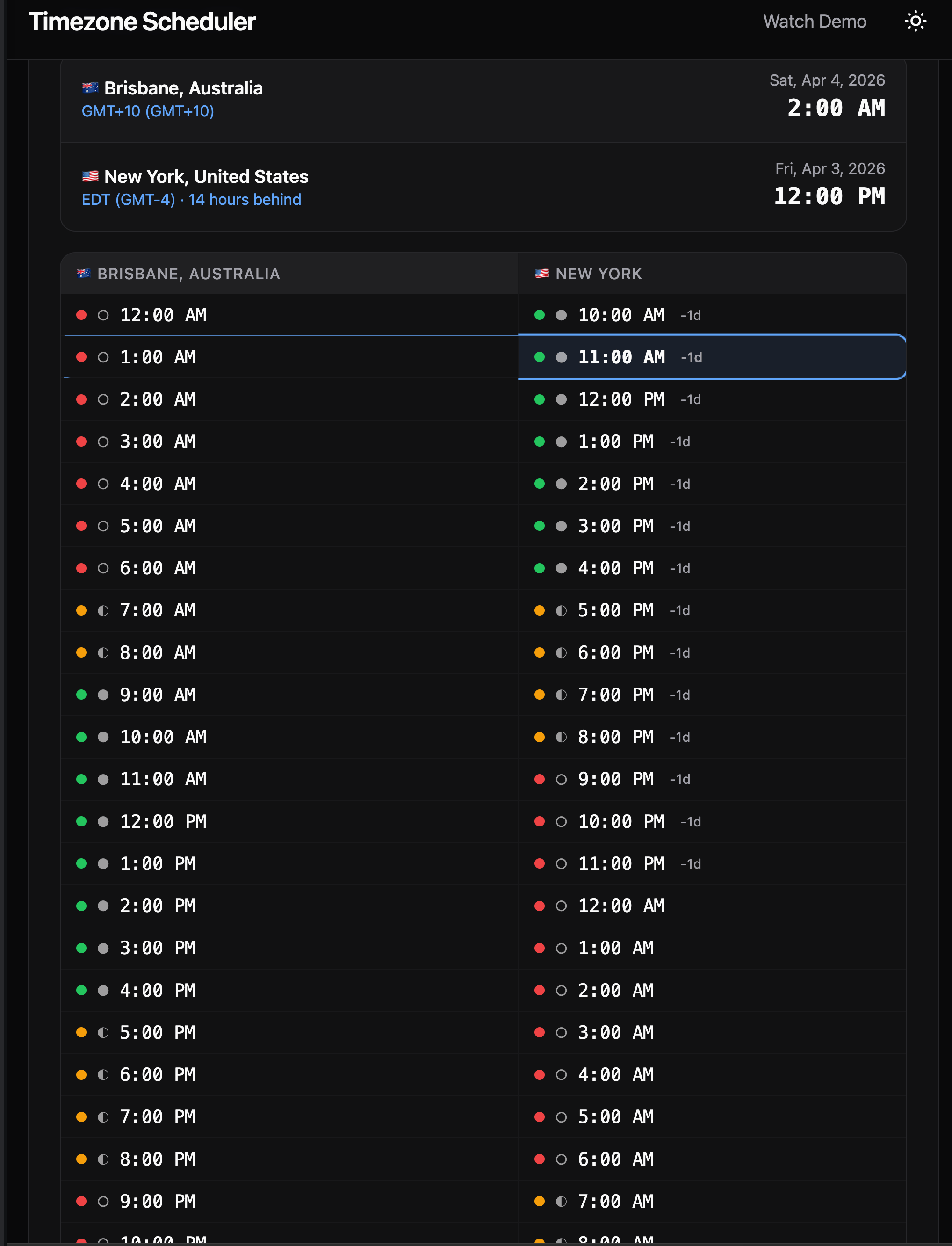
The meeting scheduler displays a 24-hour comparison grid, color-coded so you can see at a glance which hours are business hours, which are early/late but workable, and which are off hours. You can share a meeting link that preserves the full state (cities, date, time), generate a QR code, or export directly to Google Calendar, Outlook, or any calendar app. It also works offline as a PWA (Progressive Web App, meaning you can install it on your phone like a native app). Deployment is on Cloudflare Workers with automatic deploys through GitHub Actions.
Seven days, 117 commits
The Timezone Scheduler went from zero to production in seven days. The git history tells the real story of AI-assisted development, not a clean arc from idea to launch, but a messy, iterative process where features, fixes, and rethinks pile up fast.
Day 1 (March 21): From nothing to live, 19 commits. By end of day, the tool was deployed on a custom domain with a working world map, city search, 24-hour scheduler grid, light/dark theme, and responsive layout. A functional timezone tool, built and shipped in one day.
Day 2 (March 22): Making it shareable, 11 commits. I realized I needed to let people send each other meeting links, so shareable URLs landed. Then scope grew: support for comparing up to 6 cities at once, with an interface that lets you add and remove cities as tags. An accessibility audit made the tool usable for screen readers.
Day 3 (March 23): Teaching AI to use the tool, 15 commits. This was the pivotal day. One commit added 837 lines of code that turned the scheduler into an API that AI assistants can call directly (more on this in “The deeper angle” below). The same day, the comfort tie-breaker landed after the benchmark revealed the tool was picking midnight over 11 PM. I also spent several commits refining the instructions that teach AI models how to call the API correctly on their first try.
Day 4 (March 24): Locking it down, 40 commits. The single busiest day. I added code quality tools (automated formatting, pre-commit checks), a CI/CD pipeline (code gets tested and deployed automatically on every change), and automated dependency updates. Then I ran two rounds of security audits (OWASP methodology), finding and fixing injection vulnerabilities, rate limit bypasses, and cross-site scripting risks. I also built a demo video pipeline using Remotion (a React-based video framework) with custom Claude Code skills to guide the animations and sequencing.
Days 5-7 (March 25-27): Real-world bugs, 30 commits. Three more security audit rounds, each catching issues the previous round missed. Offline support so the tool works without an internet connection. An ai-image-creator skill for generating all project images through AI. An automated test suite of 38 tests against the live site. And two bugs that only surfaced when real users tried the tool: a share link that lost its data on load, and a single-character typo that showed wrong times for anyone outside my timezone.
Every one of those 117 commits was a conversation with Claude Code.
How Claude Code built it
The whole project was built through back-and-forth sessions with Claude Code. I described what I wanted in plain English, Claude Code wrote the code, and we iterated together. I used a “memory bank” system (a set of project files that Claude Code reads at the start of each session) to keep context persistent, so it remembered previous decisions instead of starting fresh every time.
The irony is not lost on me. The tool that scored 100/100 against 11 AI models was itself written by an AI. But Claude Code was not reasoning about timezone math the way those models were. It was writing deterministic code to evaluate every possibility. That is a fundamentally different task. When I asked Claude Code to implement the scoring algorithm, it produced code that loops through 24 hours, calculates each participant’s local time using the Intl API, and sums the scores. No reasoning shortcuts, no “this seems reasonable.” Just exhaustive evaluation.
The Day 3 API commit is the clearest example of what this workflow looks like at full speed. That single session produced the scheduling API with three actions (schedule, suggest, search), an OpenAPI spec (a machine-readable description of the API), an MCP server (Model Context Protocol, a standard that lets AI tools connect to external services), and an llms.txt file (plain-text instructions that teach AI models how to use the API). All 837 lines. Before implementation, I used my consult-codex skill to send Claude Code’s plan to OpenAI Codex CLI (running GPT-5.4) for a second opinion. The dual-AI review caught things neither would have caught alone. The resulting security hardening included encoding fixes for non-English city names, caching that cut redundant timezone calculations from ~3,500 to ~50, request size limits, and daylight saving gap detection.
Three parts of my Claude Code setup made this kind of velocity possible:
Claude Code auto memory – Claude Code has a built-in memory system that accumulates knowledge across sessions automatically. As I worked, it saved notes for itself: build commands, debugging insights, architecture patterns, code style preferences. On top of that, my CLAUDE.md memory bank files give it explicit project instructions. Between the two, each session starts with full contextual awareness of what has been built and decided so far.
Context7 MCP – Connects Claude Code to live library documentation. Instead of guessing how a browser API works based on its training data, Claude Code reads the current official docs.
Cloudflare Docs MCP – Does the same for Cloudflare’s platform, pulling deployment rules and API behavior from Cloudflare’s own documentation rather than inferring.
Beyond these integrations, I built project-specific Claude Code skills that extended what Claude Code could do on its own. Each was built with Claude Code and stored in the repo’s .claude/skills/ directory, so any future session picks them up automatically:
consult-codex– Sends Claude Code’s plan to a second AI (OpenAI’s Codex) for a second opinion before implementation starts. Where Codex flagged something differently, I had a real trade-off to evaluate rather than a single AI perspective to accept or reject. Read about my Claude Code /consult-codex and /consult-zai skills.ai-image-creator– Generates web app images and site graphics through multiple AI models (Gemini, FLUX.2, SeedDream, GPT-5 Image) via OpenRouter’s API, proxied through Cloudflare AI Gateway for monitoring and cost control. Supports transparent backgrounds, reference image editing, and per-project cost tracking. Every image on the site was generated this way. Read about my Claude Code ai-image-creator skill.create-demo-videoandremotion-best-practices– Produces polished MP4 demo videos using Remotion, a React-based video framework. Automated Playwright screen captures are composed into desktop and mobile formats with transitions and animated cursors. You can see the results at timezones.centminmod.com/demo-videos.timezone-tests– Runs 29 CLI tests plus 9 Chrome DevTools visual tests against the live site, covering every API endpoint, security header, share link hydration, and PWA asset. This is the skill that caught the share link and sign error bugs described below.Claude Code starter template – The
consult-codexskill and the memory bank system are part of my reusable Claude Code starter template, which I have shared publicly at github.com/centminmod/my-claude-code-setup. I will cover that setup in detail in a future post.
What did not work
The tie-breaker gap. The first version scored 98/100, not 100. When two slots tied on business hours, the tool picked midnight Brisbane over 11 PM Brisbane. Both score 6/9, but midnight is objectively worse. Two models (Gemini 3.1 Pro and Grok 4.1 Fast) had independently chosen 11 PM. I added a comfort scoring layer that measures how far the worst-off participant is from 3 AM on a circular scale. The tool improved because I benchmarked it against real alternatives and found a case it was not handling well.
The invisible sign error. Six days after launch, I found that meeting times displayed wrong when your browser timezone differed from the selected reference city. The fix was a single character: - to + in the offset correction. The bug was invisible during all my testing because my browser was set to Brisbane and I was testing with Brisbane as the reference. A one-character mistake that only surfaced when a real user in a different timezone tried it.
Share link loading order. When you open a shared meeting link, the tool needs to restore the saved cities and the saved time. The bug: the code restored the time first, then added the cities. But adding a city resets the page, which wiped the time that was just restored. The fix was doing it in the right order: cities first, then time. Obvious in retrospect, but it took tracing through the exact sequence of page updates to find.
Five rounds of security audits. I used Claude Code to run structured security audits (following OWASP methodology, the industry-standard checklist for web application security) across Days 4-7. Each round found issues the previous round missed. Round 1 caught ways an attacker could inject malicious input. Round 2 found a way to bypass rate limits on the API. Round 3 caught a timing issue in how the server tracked requests. Round 4 found that the Round 3 fix had accidentally broken how share links handle minutes. Round 5 hardened error messages and filtered special characters in calendar exports. The pattern was clear: each fix could introduce a new edge case, and no single audit pass was sufficient.
None of these bugs were caught during the initial Claude Code build sessions. They surfaced through adversarial testing, real-world usage in different timezones, and deliberate security audits. AI-assisted development is fast, but the testing and hardening phase is where quality actually gets built in.
The deeper angle: building tools that AI can call
Here is what makes this more than a scheduling story. The Timezone Scheduler is not just for humans. The API is designed so AI assistants can use it too:
/llms.txt– A plain-text file that teaches AI models how to call the API on their first attempt. It front-loads parameter names (from/to, notsource/destination), a GET URL template with placeholders, a city reference table with 33 entries, and GET vs POST syntax differences. I refined this across four commits after testing how models actually called the API. The biggest improvement was putting parameter names and the URL template above the examples, because models were copying example city names instead of substituting user input./schedule/api/schema– An OpenAPI 3.1 spec that any tool-using AI can consume programmatically. It describes the three API actions (schedule, suggest, search), request/response shapes, and scoring fields. Tools like Copilot and Gemini CLI can auto-generate client calls from this spec without reading prose documentation./schedule/api/mcp– A real MCP (Model Context Protocol) streamable-HTTP server implementing JSON-RPC 2.0 with zero external dependencies. It supportsinitialize,tools/list,tools/call, andping. Claude Code, Codex, Gemini CLI, OpenCode, and Kilo CLI can all register it as a tool server. Thellms.txtfile includes ready-to-paste MCP config blocks for each of these AI coding tools.
When a user asks any of these tools “find the best meeting time for Brisbane, New York, and London,” the AI handles natural language understanding and the Timezone Scheduler handles the precision. The AI gets 100/100 because it calls the API instead of doing the computation itself.
This pattern applies beyond timezone scheduling. Tax calculations where rules vary by jurisdiction. Unit conversions where precision matters. Compliance checks where the criteria are enumerable. Any domain where “good enough reasoning” is not actually good enough is a candidate for a purpose-built tool that AI can call.
What I learned
Benchmark before you trust. AI models sound confident even when they pick suboptimal answers. Test them on tasks with verifiable correct answers. You might be surprised how often “good enough” reasoning misses the best solution.
Build tools for the precision layer. If your domain has clear scoring criteria and the solution space is enumerable, a dedicated algorithm will outperform general-purpose AI consistently. Keep the tool focused and let AI handle everything around it.
Make your tools AI-consumable. The biggest leverage is not choosing between AI and tools. It is building tools that AI can call. Add llms.txt, OpenAPI, or MCP support and your tool becomes part of every AI workflow that touches your domain.
What’s next
I am planning a follow-up that goes deeper on how the Timezone Scheduler was actually built: the architecture decisions, the Claude Code workflow, and the specific parts where the back-and-forth with AI made a real difference. If that is useful to you, subscribe so you do not miss it.
The tool is free at timezones.centminmod.com. The full benchmark is at github.com/centminmod/timezone-scheduler.
If you’re interested in practical AI building for web apps, developer workflows, and infrastructure, subscribe for future posts. You can also follow my shorter updates on Threads (@george_sl_liu) and Bluesky (@georgesl.bsky.social) or subscribe and follow along.