

Why Ollama?
My LM Studio guide covered running Gemma 4 with the headless lms CLI. It resonated with many visitors and most of the comments were asking for the same thing with Ollama. Ollama has a larger ecosystem, simpler CLI, and since v0.15, a launch command that wires local models directly into coding agents.
The practical difference comes down to this: where LM Studio gives you a desktop app with a headless mode bolted on, Ollama is CLI-first by design. No GUI required. One binary, one command to pull a model, one command to start chatting or launch a coding agent.
This guide covers the full path: installing Ollama, pulling Gemma 4, running it on the CLI, setting a custom model storage location (essential if your Mac’s internal drive is tight), wiring it into Claude Code, Codex CLI, and OpenCode, and configuring advanced settings with Modelfiles and context tuning.
The Gemma 4 model family
Google released Gemma 4 as four models spanning edge devices to workstations:
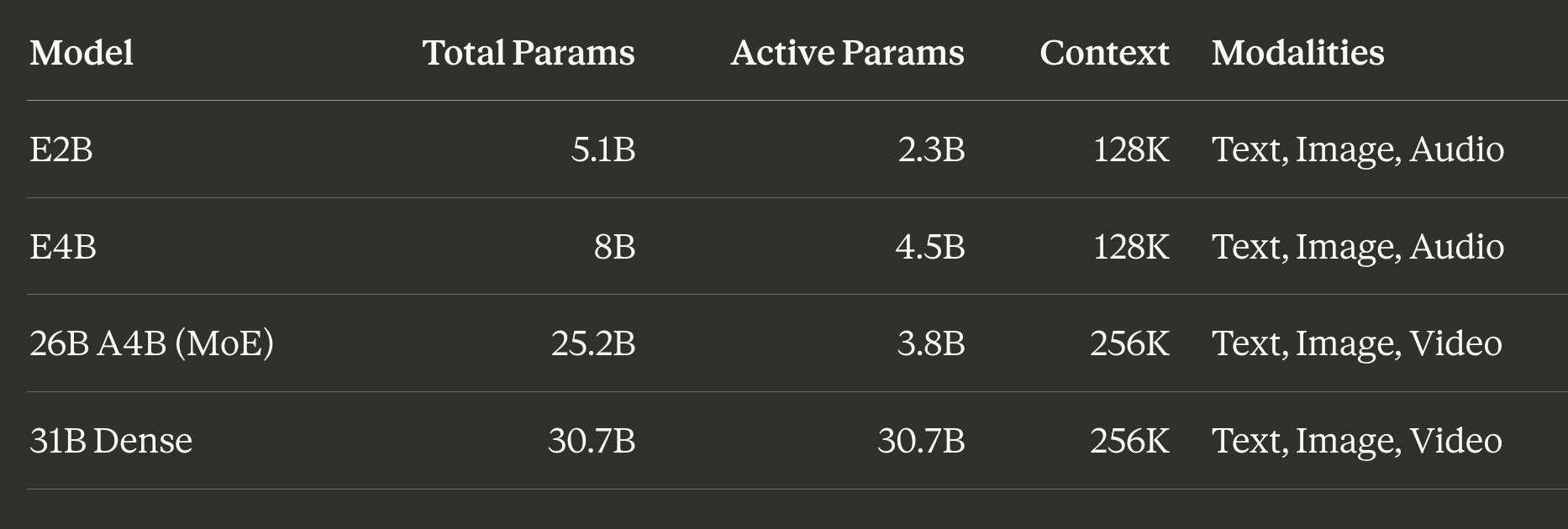
The “E” stands for “Effective” parameters. These edge-optimized models use Per-Layer Embeddings (PLE) for on-device deployment and are the only variants with audio input. The 26B and 31B natively support video understanding in addition to images, though Ollama currently exposes only text and image input for Gemma 4. The 26B-A4B is the sweet spot for most local setups: its mixture-of-experts architecture activates only 3.8B parameters per token despite having 25.2B total, delivering roughly 10B dense-equivalent quality at 4B inference cost.
All four variants support function/tool calling, structured JSON output, system prompts, configurable thinking modes, and 140+ languages. Every variant is Apache 2.0 licensed.
Ollama tags and what to pull
Ollama hosts Gemma 4 under gemma4. The default tag (gemma4:latest) maps to E4B at Q4_K_M quantization. You need Ollama 0.20 or newer for Gemma 4 support.
Shorthand tags (Q4_K_M quantization):
gemma4(default, E4B) -- 9.6 GB, 128K context. Most laptops, quick validation.gemma4:e2b-- 7.2 GB, 128K context. Minimal hardware, Raspberry Pi.gemma4:e4b-- 9.6 GB, 128K context.gemma4:26b-- 18 GB, 256K context. MoE sweet spot, 24+ GB machines.gemma4:31b-- 20 GB, 256K context. Maximum quality, 32+ GB machines.
All quantization options:
E2B:
gemma4:e2b-it-q4_K_M(7.2 GB),gemma4:e2b-it-q8_0(8.1 GB),gemma4:e2b-it-bf16(10 GB)E4B:
gemma4:e4b-it-q4_K_M(9.6 GB),gemma4:e4b-it-q8_0(12 GB),gemma4:e4b-it-bf16(16 GB)26B-A4B:
gemma4:26b-a4b-it-q4_K_M(18 GB),gemma4:26b-a4b-it-q8_0(28 GB)31B:
gemma4:31b-it-q4_K_M(20 GB),gemma4:31b-it-q8_0(34 GB),gemma4:31b-it-bf16(63 GB)
Installing Ollama
macOS (primary)
Requires macOS Sonoma (v14) or newer. Apple Silicon gets full Metal GPU acceleration automatically; Intel Macs run CPU-only.
Recommended: download the app. Get the .dmg from ollama.com/download/mac, drag to /Applications. On first launch, Ollama prompts to install the CLI symlink at /usr/local/bin/ollama. The app runs in the menu bar and starts the server automatically at http://localhost:11434.
Alternative installs:
# Homebrew (full app with menu bar icon)
brew install --cask ollama-app

# Homebrew CLI-only (no menu bar, runs as foreground process)
brew install ollama

# Shell script
curl -fsSL https://ollama.com/install.sh | sh
Verify:
ollama --version
# Should show v0.20+ for Gemma 4 support
If you used the CLI-only Homebrew formula, start the server manually with ollama serve.
Setting a custom model storage location
Ollama stores models at ~/.ollama/models by default, and Gemma 4 variants range from 7-63 GB. If your internal SSD is limited, point Ollama at an external NVMe drive before pulling models.
Default paths by OS:
macOS:
~/.ollama/modelsLinux:
/usr/share/ollama/.ollama/models(systemd) or~/.ollama/models(user)Windows:
%HOMEPATH%\.ollama\models
macOS external NVMe setup (symlink method, most reliable):
# 1. Quit Ollama (menu bar icon -> Quit)

# 2. Create destination on external drive
mkdir -p /Volumes/ExternalNVMe/ollama/models

# 3. Move any existing models
mv ~/.ollama/models/* /Volumes/ExternalNVMe/ollama/models/

# 4. Replace the directory with a symlink (mkdir -p handles fresh installs)
mkdir -p ~/.ollama && rm -rf ~/.ollama/models
ln -s /Volumes/ExternalNVMe/ollama/models ~/.ollama/models

# 5. Verify the symlink
ls -la ~/.ollama/models
# Should show: models -> /Volumes/ExternalNVMe/ollama/models

# 6. Relaunch Ollama and test
ollama list
macOS environment variable method (alternative):
# For the GUI app (persists until logout)
launchctl setenv OLLAMA_MODELS "/Volumes/ExternalNVMe/ollama/models"
# Restart Ollama app

# For shell sessions, add to ~/.zshrc
echo 'export OLLAMA_MODELS="/Volumes/ExternalNVMe/ollama/models"' >> ~/.zshrc
source ~/.zshrc
The symlink approach is more reliable because launchctl setenv is session-scoped on macOS 15+ and may not persist across reboots. If you go the environment variable route, consider creating a LaunchAgent plist for persistence.
macOS quick start: install to agent launch in five commands
If you want the fastest path from zero to running Claude Code against a local Gemma 4 model with proper context size (reduce size if you have less than 64GB memory) and custom defined LLM model download storage path, here is the entire sequence (change /Volumes/AMZ3/AI-Ollama-Models to your external drive location):
# 1. Install Ollama
brew install --cask ollama-app

# 2. Symlink model storage to external NVMe
mkdir -p /Volumes/AMZ3/AI-Ollama-Models ~/.ollama
ln -s /Volumes/AMZ3/AI-Ollama-Models ~/.ollama/models

# 3. Pull Gemma 4 26B and create a 64K context variant
ollama pull gemma4:26b
printf 'FROM gemma4:26b\nPARAMETER num_ctx 65536' > /tmp/Modelfile-64k && ollama create gemma4-26b-64k -f /tmp/Modelfile-64k

# 4. Launch Claude Code with the 64K model
ollama launch claude --model gemma4-26b-64k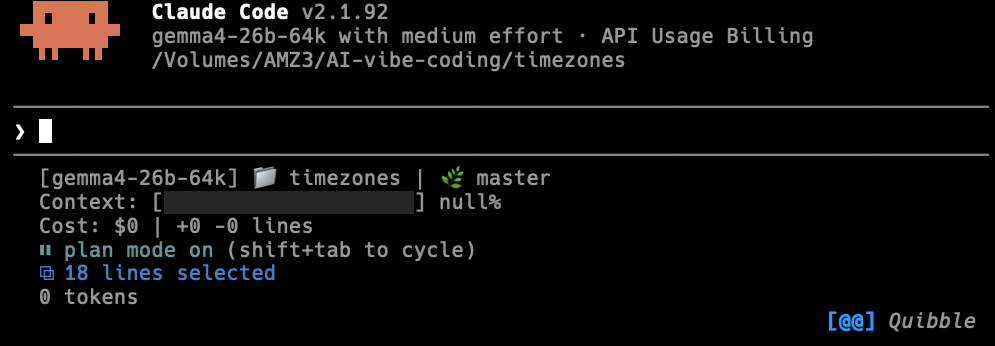
First-run notes:
After installing via Homebrew, open Ollama from
/Applications(or Spotlight) to trigger the initial launch. macOS will prompt for Touch ID or your password to approve the app. If you getError: timed out waiting for server to start, the server is still initializing. Give it 10-15 seconds and retry.Ollama using gemma4-26b-64k modelfile and even 48K version saw swapping to disk by ~35GB on my MacBook Pro M4 Pro with 48GB memory. Much higher than when I used LM Studio with 48K context window as it appears to pre-allocate the full KV cache upfront as opposed to incrementally. If you see swap, try dropping to 32K context (
num_ctx 32768) or using KV cache quantization (OLLAMA_KV_CACHE_TYPE=q8_0).Step 2 assumes a fresh install with no existing models. If you already have models at
~/.ollama/models, move them to the external drive first (see the full instructions above). Step 4 bakes the 64K context into the model variant so every agent launch gets it automatically.
Linux (systemd override):
sudo systemctl stop ollama
sudo mkdir -p /mnt/external/ollama-models
sudo mv /usr/share/ollama/.ollama/models/* /mnt/external/ollama-models/
sudo chown -R ollama:ollama /mnt/external/ollama-models

sudo systemctl edit ollama.service
# Add:
# [Service]
# Environment="OLLAMA_MODELS=/mnt/external/ollama-models"

sudo systemctl daemon-reload
sudo systemctl start ollama
Windows: Settings -> search “environment variables” -> Edit environment variables for your account -> New: OLLAMA_MODELS = D:\OllamaModels. Quit and relaunch Ollama.
Linux and Windows quick install
Linux:
curl -fsSL https://ollama.com/install.sh | sh
ollama --version
systemctl status ollama
The script creates an ollama system user, installs to /usr/local/bin, and sets up a systemd service. For NVIDIA GPUs, it optionally installs CUDA drivers.
Windows: Download OllamaSetup.exe from ollama.com/download. Installs to your home directory and runs in the system tray. For WSL2: install inside your WSL2 distribution using the Linux script; GPU passthrough works with recent NVIDIA drivers on Windows 11.
Quick start: pulling and running Gemma 4
# Pull the MoE variant (my recommendation for 24+ GB machines)
ollama pull gemma4:26b

# Or pull the default E4B for lighter hardware
ollama pull gemma4

# Start an interactive chat
ollama run gemma4:26b
Example running custom 16K context modelfile with —verbose flags
ollama run gemma4-26b-16k --verbose
>>> hello
Thinking...
The user said "hello".
The user is initiating a conversation.

    *   Acknowledge the greeting.
    *   Maintain a polite, helpful, and friendly tone.
    *   Offer assistance.
"Hello! How can I help you today?" or "Hi there! How can I assist you?"
...done thinking.

Hello! How can I help you today?

total duration:       4.54218925s
load duration:        143.076792ms
prompt eval count:    16 token(s)
prompt eval duration: 2.790493541s
prompt eval rate:     5.73 tokens/s
eval count:           81 token(s)
eval duration:        1.514401459s
eval rate:            53.49 tokens/s
One-shot prompts and piping
Ollama pipe anything into it:
# Quick question
ollama run gemma4:26b "Explain the difference between TCP and UDP in two sentences."

# Code review from a file
cat main.py | ollama run gemma4:26b "Review this code for bugs:"

# Summarize a document
ollama run gemma4:26b "Summarize:" < meeting_notes.txt

# Generate a commit message from a diff
git diff HEAD~1 | ollama run gemma4:26b "Write a commit message for this diff:"
Vision (image input)
Every Gemma 4 variant accepts images directly:
ollama run gemma4:26b "Describe this screenshot: /path/to/screenshot.png"Essential CLI commands
ollama list              # List all downloaded models
ollama ps                # Show running models with GPU allocation
ollama show gemma4:26b   # Display model card, architecture, quantization
ollama show gemma4:26b --modelfile    # Export full Modelfile
ollama show gemma4:26b --parameters   # Show parameter settings
ollama rm gemma4:e2b     # Remove a model
ollama stop gemma4       # Unload a running model from memory
ollama cp gemma4 gemma4-custom        # Copy/alias a model
The ollama ps output is especially useful. The PROCESSOR column shows your GPU/CPU split (e.g., 100% GPU or 48%/52% CPU/GPU), telling you immediately whether the model fits entirely in VRAM.
REPL slash commands
Inside the interactive chat (ollama run <model>), these commands are available:
/set parameter num_ctx 8192     Set context window size
/set parameter temperature 0.3  Adjust creativity
/set system "You are a ..."     Set system prompt
/set format json                Enable JSON output mode
/set verbose                    Show generation statistics
/show info                      Display model architecture info
/save my-gemma-variant          Save current session as a new model
/load another-model             Switch to a different model
/clear                          Clear conversation context
/bye                            Exit (also: /exit or Ctrl+D)
Use triple quotes (""") for multiline input. Press Ctrl+G to open your $EDITOR for longer prompts.
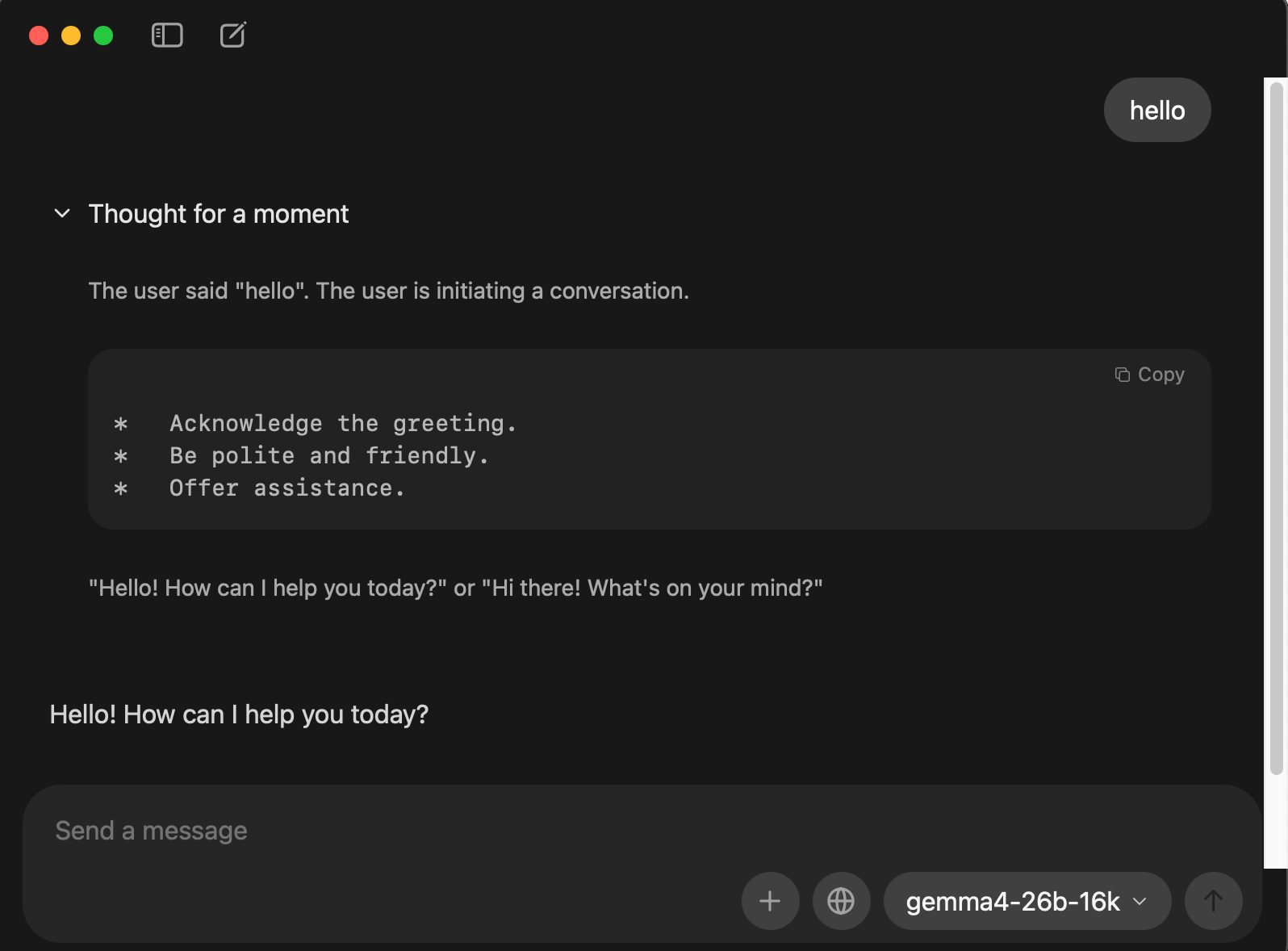
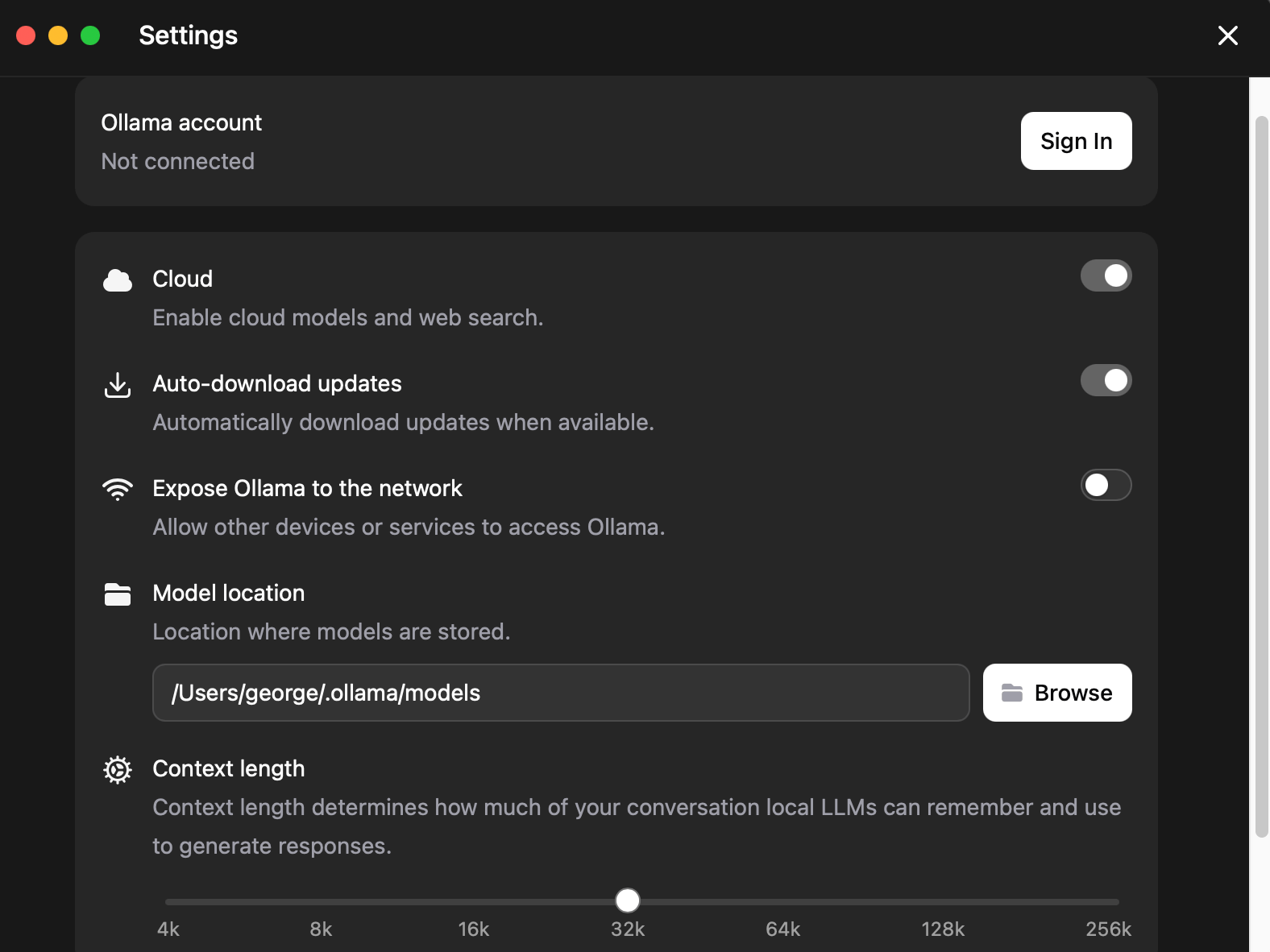
Ollama MacOS App
Besides the command line interface, Ollama also has a native GUI interface.
Memory estimates and context sizing
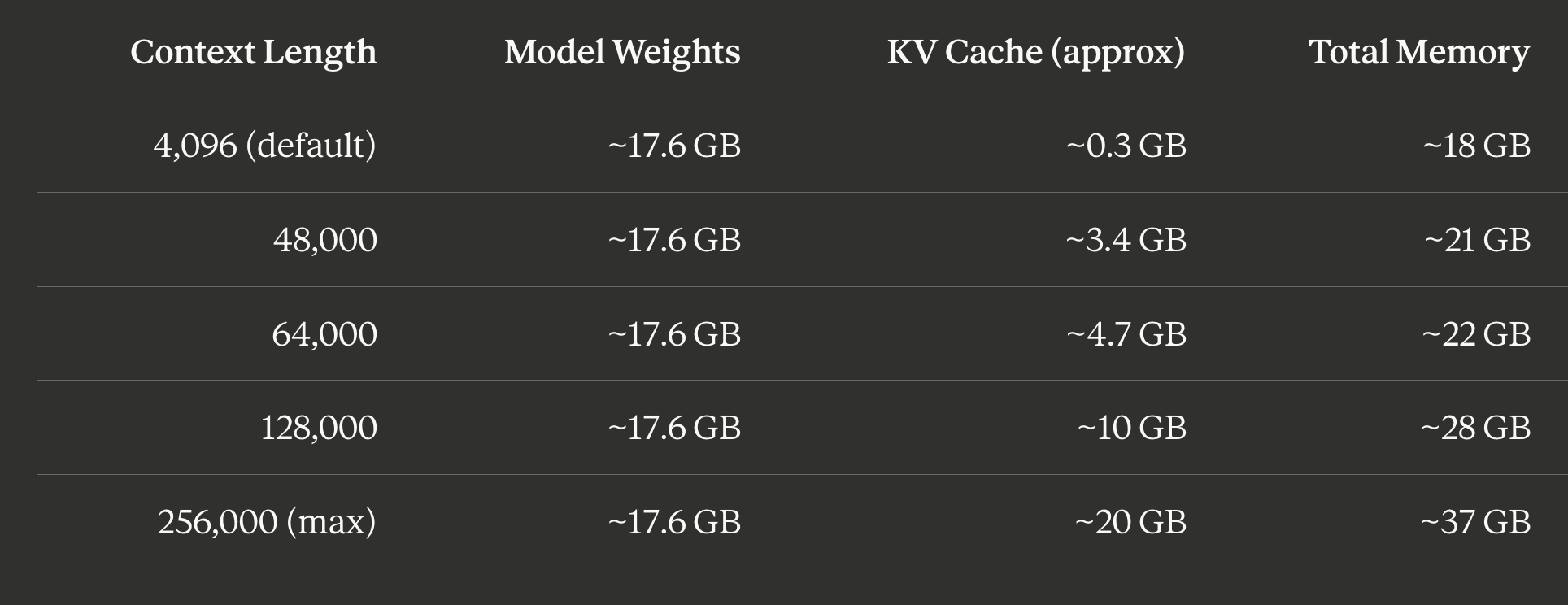
Understanding memory is the single most important thing for local inference. The formula:
Total memory = Model weights + KV cache (scales with context length) + OS overhead
Model weights are fixed. The KV cache is where it gets interesting: it grows linearly with context length and can easily exceed the model weights at long contexts.
Gemma 4 26B-A4B (Q4_K_M) memory by context length
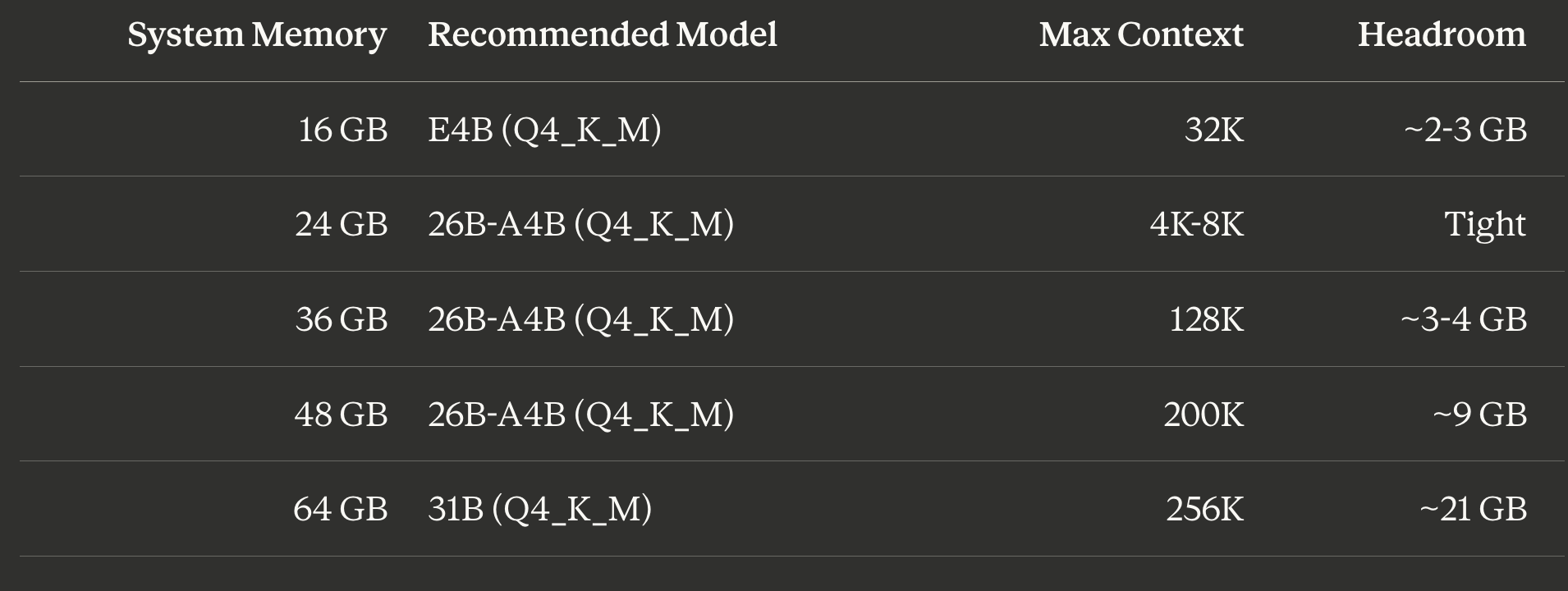
Hardware recommendations
Reducing memory at long contexts
Two high-leverage settings that cost nothing in speed:
# macOS (set before launching Ollama app)
launchctl setenv OLLAMA_FLASH_ATTENTION 1
launchctl setenv OLLAMA_KV_CACHE_TYPE q8_0

# Linux (systemd override)
sudo systemctl edit ollama.service
# Add: Environment="OLLAMA_FLASH_ATTENTION=1"
# Add: Environment="OLLAMA_KV_CACHE_TYPE=q8_0"
Flash Attention: Always enable. Reduces memory usage with no quality penalty.
KV cache quantization:
q8_0cuts KV cache memory roughly in half with minimal quality loss.q4_0cuts it by 75% but with moderate quality impact.
Claude Code, Codex, OpenCode
Since Ollama v0.15, a single command configures and starts any supported coding agent against a local model.
Claude Code with Ollama
Claude Code is Anthropic’s agentic coding tool. Since Ollama v0.14.0, Ollama implements the Anthropic Messages API, so Claude Code connects directly.
Install Claude Code:
# macOS / Linux
curl -fsSL https://claude.ai/install.sh | bash

# Windows (PowerShell)
irm https://claude.ai/install.ps1 | iex

# Alternative via npm
npm install -g @anthropic-ai/claude-code
Launch with one command:
# Interactive model selection
ollama launch claude

# Specify Gemma 4 directly
ollama launch claude --model gemma4:26b

# Or the dense flagship
ollama launch claude --model gemma4:31b
ollama launch claude auto-sets ANTHROPIC_AUTH_TOKEN, ANTHROPIC_BASE_URL, and ANTHROPIC_API_KEY.
Manual setup (for scripting or CI):
export ANTHROPIC_AUTH_TOKEN=ollama
export ANTHROPIC_API_KEY=""
export ANTHROPIC_BASE_URL=http://localhost:11434

claude --model gemma4:26b
Or as a persistent shell alias in ~/.zshrc:
alias claude-local='ANTHROPIC_AUTH_TOKEN=ollama ANTHROPIC_BASE_URL=http://localhost:11434 ANTHROPIC_API_KEY="" claude'

# Usage
claude-local --model gemma4:26b
Critical: increase context length. Ollama defaults to 4,096 tokens. Claude Code needs at least 64K to function properly. Three ways to fix this:
# Method 1: Environment variable (simplest)
export OLLAMA_CONTEXT_LENGTH=65536
# Restart Ollama

# Method 2: Save a variant with larger context
ollama run gemma4:26b
>>> /set parameter num_ctx 65536
>>> /save gemma4-26b-64k
>>> /bye
ollama launch claude --model gemma4-26b-64k

# Method 3: Modelfile (most reproducible, see Advanced section below)
Codex CLI with Ollama
OpenAI’s Codex CLI.
Install and launch:
npm install -g @openai/codex

# Quick launch
ollama launch codex --model gemma4:26b

# Configure without launching (writes config file)
ollama launch codex --config
Manual setup via ~/.codex/config.toml:
[model_providers.ollama-local]
name = "Ollama"
base_url = "http://localhost:11434/v1"

[profiles.gemma-local]
model = "gemma4:26b"
model_provider = "ollama-local"
codex --profile gemma-localSame context requirement as Claude Code: 64K tokens minimum.
OpenCode with Ollama
OpenCode is an open-source coding assistant with an elegant TUI (Terminal User Interface).
Install and launch:
curl -fsSL https://opencode.ai/install | bash
# Or: brew install opencode

ollama launch opencode --model gemma4:26b
Manual configuration via ~/.config/opencode/opencode.json:
{
  "$schema": "https://opencode.ai/config.json",
  "provider": {
    "ollama": {
      "npm": "@ai-sdk/openai-compatible",
      "name": "Ollama",
      "options": {
        "baseURL": "http://localhost:11434/v1"
      },
      "models": {
        "gemma4:26b": {
          "name": "Gemma 4 26B"
        }
      }
    }
  }
}
OpenCode also needs an auth placeholder at ~/.local/share/opencode/auth.json:
{
  "ollama": {
    "type": "api",
    "key": "ollama"
  }
}
Inside the TUI, use /models to switch models, /init to initialize a project.
Limitations versus cloud APIs
Running Gemma 4 locally through Ollama is private, free, and offline, but comes with real trade-offs:
Quality gap: Gemma 4 26B-A4B is impressive for its size but noticeably weaker than Claude Sonnet or Opus
Tool calling reliability: Gemma 4 supports function calling natively, but models like
qwen3-codercurrently have more consistent tool use with Claude CodeSpeed: GPU-accelerated inference is fast (50+ tok/sec for E4B on Apple Silicon) but CPU-only is painfully slow for larger models
Context window: even at 64K, you have far less room than the 200K+ context cloud models
Running Gemma 4 with a GUI via Onyx
Onyx is an open-source AI platform listed on Ollama’s integration docs. It provides a GUI chat interface. For a lighter option, Open WebUI is the most popular Ollama GUI.
Onyx setup (requires Docker):
curl -fsSL https://onyx.app/install_onyx.sh | bashRuns at http://localhost:3000. During setup, select Ollama as LLM provider. If Onyx runs inside Docker and Ollama is on the host, use http://host.docker.internal:11434 as the API URL.
Open WebUI alternative (lighter, single command):
docker run -d -p 3000:8080 \
  --add-host=host.docker.internal:host-gateway \
  -v open-webui:/app/backend/data \
  --name open-webui \
  ghcr.io/open-webui/open-webui:main
Navigate to http://localhost:3000, create an account, and select your Gemma 4 model from the dropdown. Open WebUI auto-detects all local models.
Advanced: Modelfiles for reproducible configs
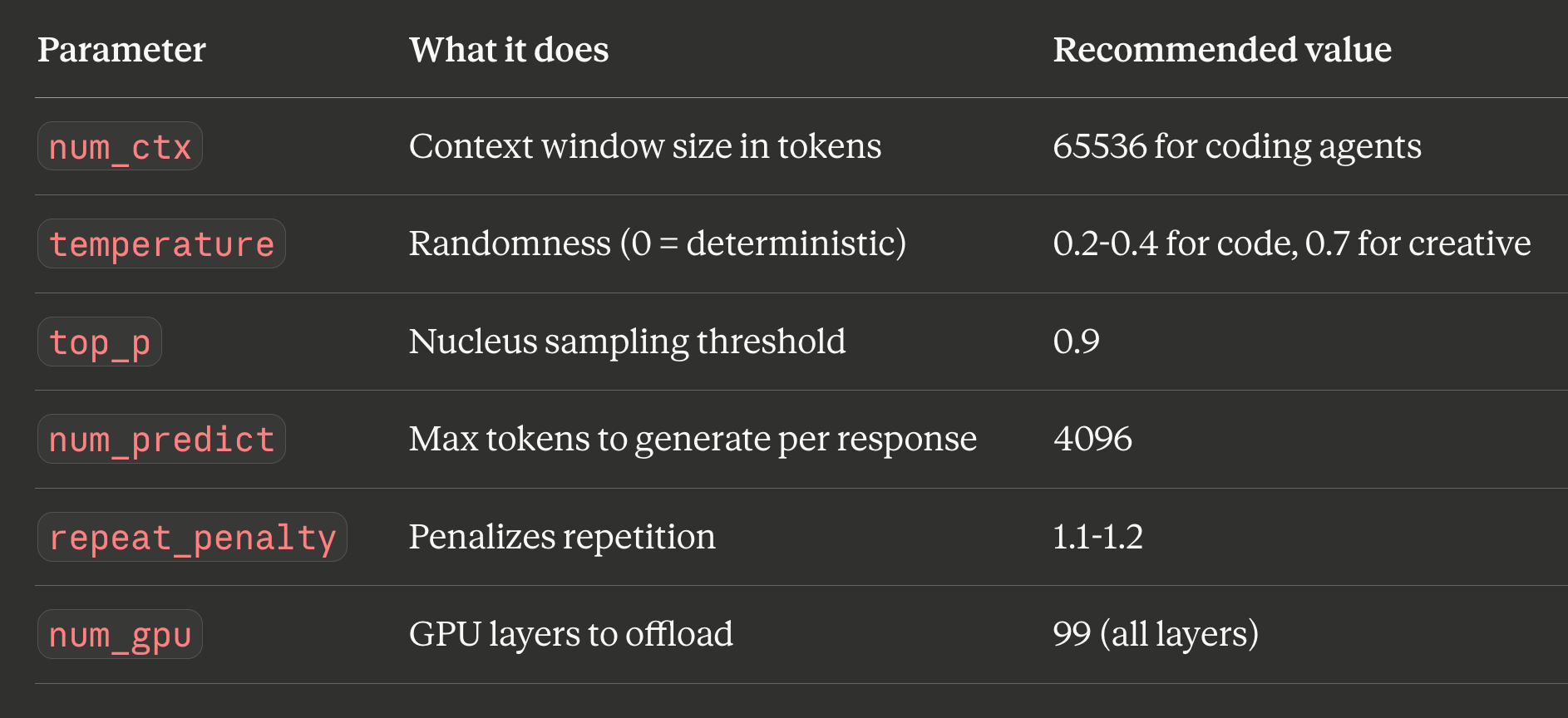
A Modelfile is Ollama’s equivalent of a Dockerfile: a blueprint for creating customized model variants. It locks in parameters, system prompts, and templates.
Coding-focused Modelfile for Gemma 4 26B:
FROM gemma4:26b

PARAMETER temperature 0.4
PARAMETER top_p 0.9
PARAMETER num_ctx 65536
PARAMETER num_predict 4096
PARAMETER repeat_penalty 1.15

SYSTEM """You are a senior full-stack developer. Write clean, well-documented code. Always explain your reasoning before writing code. Prefer TypeScript over JavaScript."""
# Build it
ollama create gemma4-coder -f ./Modelfile
# Run it directly
ollama run gemma4-coder
# Or launch with a coding agent
ollama launch claude --model gemma4-coderWhy Modelfiles matter for coding agents: both Codex and OpenCode expect large context (64K+) and behave inconsistently. Baking num_ctx 65536 into a Modelfile variant ensures the right context.
Key Modelfile parameters
Key environment variables
OLLAMA_FLASH_ATTENTION=1         # Always enable
OLLAMA_KV_CACHE_TYPE=q8_0        # KV cache quantization
OLLAMA_CONTEXT_LENGTH=65536      # Default context for all models
OLLAMA_NUM_PARALLEL=1            # Parallel requests (each needs its own KV cache)
OLLAMA_MAX_LOADED_MODELS=1       # Max models in memory at once
OLLAMA_HOST=0.0.0.0:11434       # Bind address (default: 127.0.0.1)
OLLAMA_ORIGINS=*                 # CORS origins for web UIs
OLLAMA_DEBUG=1                   # Verbose logging
What I learned
ollama launch is the right abstraction. Setting up Claude Code, Codex, or OpenCode with a local model used to mean juggling 5+ environment variables.
Set your model storage location first. Before pulling a single model, decide where models will live. Gemma 4 variants range from 7-63 GB.
Context length is the gotcha. Ollama defaults to 4,096 tokens. Coding agents need 64K minimum. Every person who reports “Claude Code doesn’t work with Ollama” is probably hitting this.
Flash Attention + KV cache quantization are free wins. Enabling both lets you push context length significantly higher on the same hardware with minimal quality impact. Always set OLLAMA_FLASH_ATTENTION=1.
The MoE advantage is real. Gemma 4 26B-A4B activates only 3.8B parameters per token but delivers roughly 10B dense-equivalent quality. For local inference, this gives you the best quality-per-GB of memory. But still needs adequate available system memory.
What did not work
The 4K default context is a silent killer. Claude Code does not error when context is too small. This is the single most common “Ollama + Claude Code is broken” report online, and the fix is always the same: increase num_ctx to at least 65536.
Tool calling is functional but not specialist-grade. For pure code generation, models like qwen3-coder have more consistent function calling with Claude Code. Gemma 4’s strength is being a strong generalist with vision support, not a specialist coder.
launchctl setenv on macOS 15+ is unreliable across reboots. If you rely on it for OLLAMA_MODELS or OLLAMA_FLASH_ATTENTION, your settings may disappear after a restart. The symlink method for model storage and a LaunchAgent plist for environment variables are more durable solutions.
What is next
This guide covered the Google Gemma 4 based Ollama workflow. My previous guide covered LM Studio.
I am also testing dedicated coding models (Qwen 3.5, GLM 4.7 Flash, Nemotron 3 Nano). A comparison post covering where each model performs best maybe in the pipeline.
If you want to try this setup today:
Install Ollama: download from ollama.com or
brew install --cask ollama-appChat locally:
ollama run gemma4:26bLaunch Claude Code:
ollama launch claude --model gemma4:26bLaunch Codex:
ollama launch codex --model gemma4:26bLaunch OpenCode:
ollama launch opencode --model gemma4:26b
If you’re interested in practical AI building for web apps, developer workflows, and infrastructure, subscribe for future posts. You can also follow my shorter updates on Threads (@george_sl_liu) and Bluesky (@georgesl.bsky.social) or subscribe and follow along.
Excellent and clean explanation that has me from zero to up-and-going with AI coding a lot quicker than I expected.
Thanks!
What is the minimum spec MacBook that can be run? I have a M1 16GB model, so accepting the speed would be lower, the model selection would be smaller, can this configuration still operate/function? I would be doubtful of setting a 64K context with this hardware, but would the smaller gemma4:eb2 or gemma4:e4b-it-q8_0 models be able to use it?