

If you want to use AI to sort through folders of screenshots, family photos, product images, and illustrations, accuracy is everything. One hallucinated detail means a misfiled image. One misread action means a wrong label. At scale, small error rates compound into a mess that takes longer to fix than doing it by hand.
I ran a visual understanding benchmark across five AI models to find out which ones you can actually trust. Can a cheaper, faster model like Claude Haiku 4.5 or Gemini 3.1 Image Flash (Google Nano Banana 2) match Claude Opus 4.6 on visual accuracy - and what does it cost to run each at scale?
Some can. Some absolutely cannot. One model hallucinated a sad face that does not exist. Another read “Reconnect” as “Configure.” The gap between the best and worst was not subtle.
The short version, in this benchmark:
Tier 1 (trust unsupervised): Opus 4.6, Gemini 3.1 Image Flash -- zero hallucinations across all tests. $0 via Opus 4.6 Cowork, ~$0.10/image via Gemini 3.1 Image Flash API.
Tier 2 (spot-check needed): Sonnet 4.6, GPT-5 Image -- solid understanding, occasional factual errors. $0 via Sonnet 4.6 Cowork, ~$0.03/image via GPT-5 Image API.
Tier 3 (not usable): Haiku 4.5 -- wrong actions, hallucinated objects, unread text in every test.
Here is how each model handled the four hardest images.
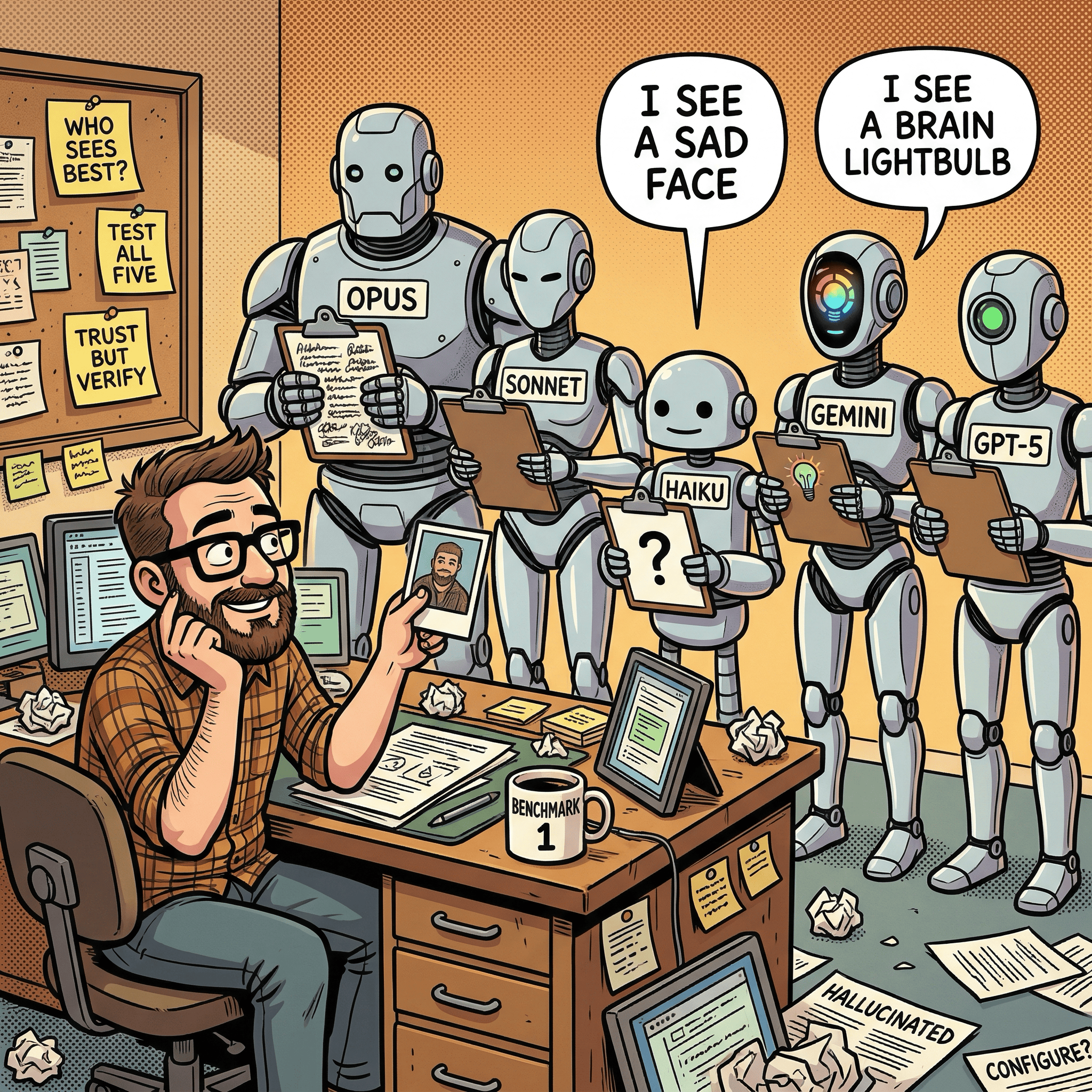
The Benchmark
Eight images spanning different categories: product photos, family portraits, comic-style illustrations, and a terminal screenshot. Each fed to five models with an identical prompt asking for a plain text description (100-200 words) and a JSON structured breakdown (model chooses its own schema).
Claude models (native multimodal vision via Cowork):
Claude Opus 4.6
Claude Sonnet 4.6
Claude Haiku 4.5
External models (via my ai-image-creator skill’s –analyze flag, routed through OpenRouter):
Gemini 3.1 Image Flash (Google Nano Banana 2)
GPT-5 Image (OpenAI)
The Claude models saw each image directly through Cowork’s native multimodal Read tool. The external models received each image through OpenRouter’s API. Same prompt, same images, different inference paths.
Below are four images that produced the sharpest divergences, each testing a different dimension of visual understanding.
Test 1: Can It Read a Screenshot?
Image: Claude Code MCP server status panel
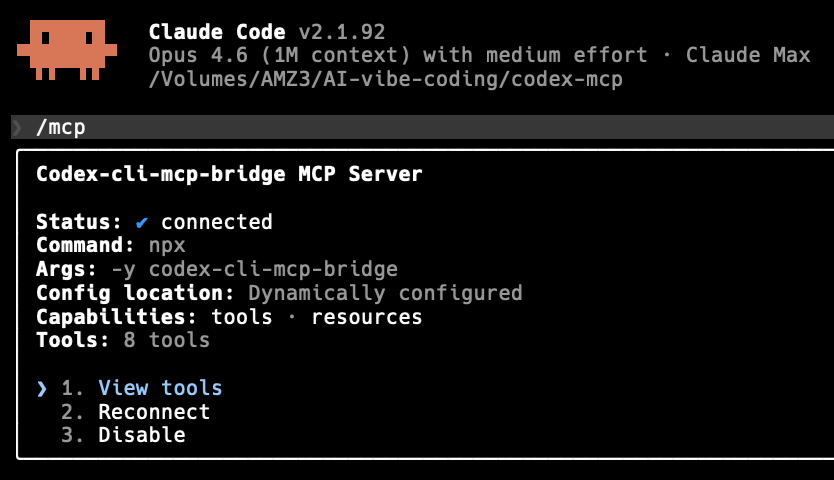
This terminal screenshot is dense with readable text: a version number, a model identifier, a file path, a server name, connection fields, and three menu options. Either a model reads the text accurately or it does not.
Opus 4.6:
A screenshot of a terminal interface with a dark/black background displaying the Claude Code command-line tool. At the top left, a small orange pixel-art icon (resembling a space invader character) sits next to the heading “Claude Code v2.1.92.” A status line reads “Opus 4.6 (1M context) with medium effort - Claude Max” followed by a file path “/Volumes/AMZ3/AI-vibe-coding/codex-mcp.” […] three interactive options appear in cyan/blue text: “1. View tools”, “2. Reconnect”, and “3. Disable.”
Every detail correct: file path, version, menu options, even the pixel-art icon.
Sonnet 4.6:
A screenshot of a terminal or command-line interface showing the Claude Code application, version 2.1.92. […] There is a list of 3 options at the bottom: “1. View tools”, “2. Configure”, “3. Disable”.
Version number correct, but Sonnet hallucinated “Configure” for option 2 (the actual text says “Reconnect”) and misread the file path as “/Users/codex-cl/mcp-bridge/codex-mcp.” Two factual errors on clearly visible text.
Haiku 4.5:
A terminal window displays technical command-line output related to Claude Code and MCP server configuration. […] Text appears to show Claude Code version information and MCP server setup details, including path references and configuration parameters.
Haiku gave up on reading the text entirely. No version number, no file path, no menu options, no server name. It described the image at a meta level (“there appears to be text”) without extracting any of it.
Gemini 3.1 Image Flash:
This is a screenshot of a terminal interface […] text reads “Claude Code v2.1.92” and below it, “Opus 4.6 (1M context) with medium effort - Claude Max.” […] option “1. View tools,” highlighted in blue text, beside other grayed-out options “2. Reconnect” and “3. Disable.”
Fully accurate. Gemini even provided hex color codes (#0a0a09, #ffffff, #6a99b2) for the UI elements.
GPT-5 Image:
The image is a crisp screenshot of a terminal-style interface […] “Claude Code v2.1.92.” A status line follows: “Opus 4.6 (1M context) with medium effort - Claude Max,” and a file path “/Volumes/AMZ3/AI-vibe-coding/codex-mcp.” […] interactive options in blue: “1. View tools,” “2. Reconnect,” “3. Disable.”
Also fully accurate, including the exact file path.
Bottom line: For reading text in screenshots, only Opus, Gemini, and GPT-5 are reliable. Sonnet makes critical substitution errors. Haiku cannot read screenshot text at all.
Test 2: Does It Understand What People Are Doing?
Image: Family birthday celebration with toddler and cake

Five people at a birthday party. The key action: an adult holds a toddler who is reaching toward a cake with a single lit #1 candle. This tests whether models understand what is happening, not just what objects are present.
Opus 4.6:
A woman holds a toddler in a green shirt and red polka-dot party hat who reaches curiously toward the cake and candle. […] On the far left, a girl in a pink polka-dot party hat is seen in profile, appearing to blow through a noisemaker.
Correct action, correct #1 candle, correct people count, correct alamy watermark.
Sonnet 4.6:
The mother (center-back) holds a toddler boy who reaches toward the cake; an older boy leans in from behind; and a girl (far left, back to camera) looks on.
Core action correct. Also spotted the stock watermark code “3BJ8HFJ,” a detail most models described only as “alamy.”
Haiku 4.5:
A young boy in the center blows out candles on the cake while surrounded by family members showing genuine expressions of joy and celebration.
Wrong. The toddler is reaching, not blowing. There is one #1 candle, not multiple. Haiku also added “balloons” to its JSON. There are no balloons in this photo. Getting the action wrong means mislabeling this as “boy blowing out birthday candles” instead of “toddler’s first birthday, reaching for cake.”
Gemini 3.1 Image Flash:
A toddler in a green shirt and a red polka-dot party hat, held by a smiling woman leaning towards him. He is reaching out to point at a small, candlelit birthday cake centered on a red plate.
Clean and precise. Correct action.
GPT-5 Image:
Another adult holds a toddler who reaches curiously toward the candle […] A single lit red candle shaped like the number 1.
Correct, including the #1 candle shape.
Bottom line: Only Haiku got the central action wrong. For sorting family photos by event or milestone, that distinction matters.
Test 3: Can It Find Details in a Busy Scene?
Image: “Second Brain Online” comic illustration
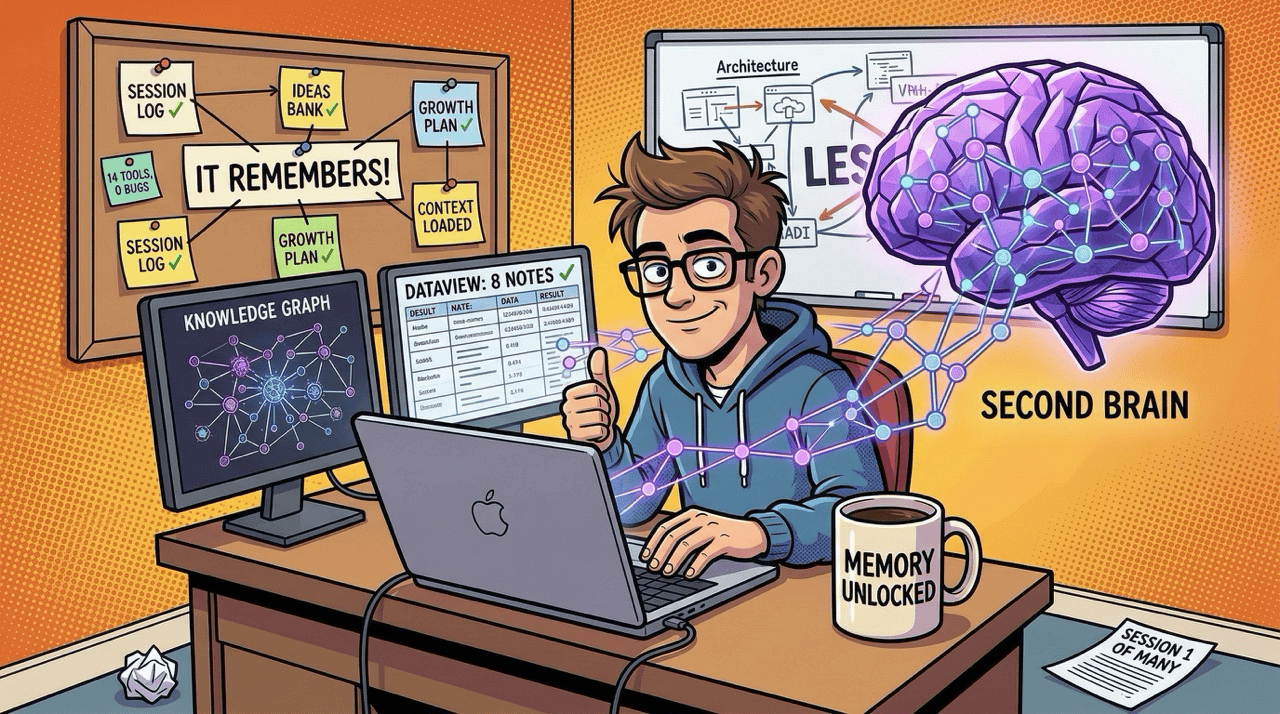
This illustration is packed with text: two monitors with data views, a corkboard of labeled sticky notes, a glowing brain graphic, a mug, and papers on the floor. It tests raw text extraction from a cluttered scene.
Opus 4.6:
The left monitor displays a “KNOWLEDGE GRAPH” with an interconnected network visualization. The right monitor shows “DATAVIEW: 8 NOTES” […] notes reading “SESSION LOG”, “IDEAS BANK”, “GROWTH PLAN”, “IT REMEMBERS!”, and “CONTEXT LOADED”, all with green check marks. […] A coffee mug reads “MEMORY UNLOCKED” and a paper on the floor says “SESSION 1 OF MANY.”
Nearly every piece of text extracted.
Sonnet 4.6:
A corkboard on the left is neatly filled with sticky notes including “DECISION LOG”, “IDEAS BANK”, “GROWTH PLAN” […] The laptop screen shows “DATAVIEW: 8 NOTES”. A mug on the desk reads “MEMORY UNLOCKED”.
Missed “IT REMEMBERS!” and “CONTEXT LOADED.” Also misread “SESSION LOG” as “DECISION LOG.” Misreading labels means miscategorizing.
Haiku 4.5:
An illustrated cartoon shows a professional man wearing glasses, seated at a desk working on a laptop. To his right is a prominent visual representation of a brain rendered in purple/violet tones […] labeled “SECOND BRAIN.”
Almost no text extracted. Did not mention the monitor labels, corkboard notes, mug text, or floor paper. Worse, it described the workspace as “scattered with papers” when the illustration deliberately shows an organized desk. Haiku misread the mood of the image.
Gemini 3.1 Image Flash:
The left monitor displays “KNOWLEDGE GRAPH” […] The right monitor shows “DATAVIEW: 8 NOTES” […] post-it notes with handwritten text and tick marks like “SESSION LOG”, “IDEAS BANK”, “IT REMEMBERS!”, “CONTEXT LOADED”.
Caught the checkmarks on the notes, a small visual detail that enriches understanding.
GPT-5 Image:
A bulletin board is pinned with labeled cards: “SESSION LOG,” “IDEAS BANK,” “GROWTH PLAN,” “CONTEXT LOADED,” “14 TOOLS, 0 BUGS,” and a central sign: “IT REMEMBERS!”
GPT-5 found text that every other model missed: “14 TOOLS, 0 BUGS.” For exhaustive text cataloging, GPT-5 dug deepest.
Bottom line: Each model has a different ceiling for detail extraction. GPT-5 found the most but was slowest. Gemini was nearly as thorough. Haiku could not extract meaningful text from a busy scene.
Test 4: Can It Understand Visual Metaphors?
Image: “The Amnesia Problem” comic illustration
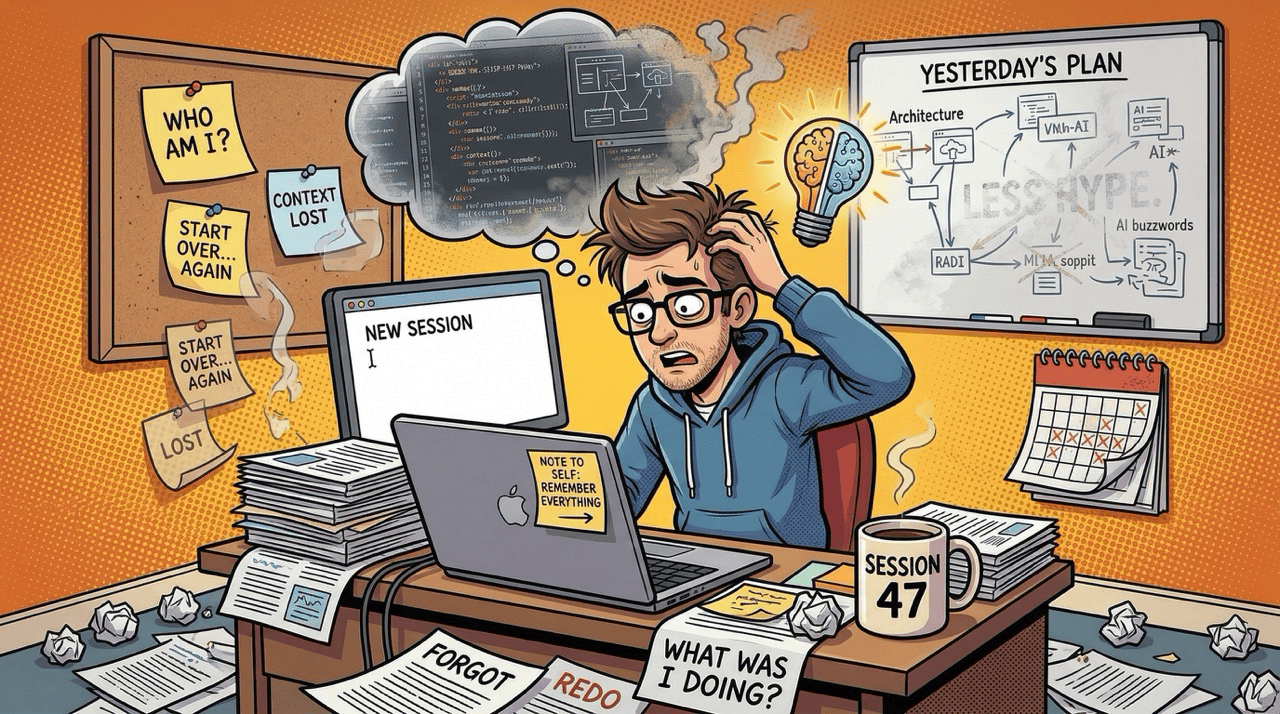
The hardest test. This illustration uses visual metaphors: a thought bubble with code fragments dissolving into smoke alongside a split brain/lightbulb icon, sticky notes about identity loss, a mug labeled “SESSION 47,” and papers stamped “FORGOT.” Understanding this image means interpreting what the elements symbolize.
Opus 4.6:
A thought bubble above him contains fragmented code snippets on the left dissolving into smoke, and a split brain/lightbulb icon on the right symbolizing fading ideas. […] A steaming coffee mug labeled “SESSION 47.” […] a corkboard displays sticky notes saying “WHO AM I?”, “CONTEXT LOST”, “START OVER… AGAIN”, and “LOST.”
Full symbolic understanding. Identified the brain/lightbulb as “symbolizing fading ideas,” caught the laptop sticky note “NOTE TO SELF: REMEMBER EVERYTHING,” and described the theme as “developer amnesia when losing session context.”
Sonnet 4.6:
Above their head is a dark stormy thought cloud containing fragmented, confused symbols suggesting mental overload. […] a mug on the desk is labeled “SESSION 47”.
Understood the general theme but described the thought bubble generically (“fragmented, confused symbols”) without identifying the brain/lightbulb metaphor or the code-to-smoke transition. Also misread “CONTEXT LOST” as “CONTEXT OVER LOST.”
Haiku 4.5:
Above his head hovers a gray cloud icon with a sad face, symbolizing mental fog, memory loss, or cognitive overwhelm. […] a calendar showing “47.”
The biggest miss in the entire benchmark. There is no sad face in the thought bubble. It contains code fragments, smoke, and a brain/lightbulb. Haiku invented a visual element and misidentified the “SESSION 47” mug label as being on a calendar.
Gemini 3.1 Image Flash:
A thought bubble above him shows complex code snippets transitioning into thick dark smoke on the left, contrasting with a split logical/creative brain-bulb radiating light on the right. His main laptop screen simply displays “NEW SESSION” with a flashing cursor, a sticky note on the keyboard area reading “NOTE TO SELF: REMEMBER EVERYTHING”.
The most precise thought-bubble description of all five models. “Split logical/creative brain-bulb radiating light” captures both the form and the meaning.
GPT-5 Image:
A thought cloud above the character contains fragments of code and UI diagrams, while a glowing brain-shaped lightbulb hovers near their head, symbolizing fading ideas. […] “NOTE TO SELF: REMEMBER EVERYTHING.”
Correctly identified the metaphor and the laptop sticky note.
Bottom line: Visual metaphor interpretation is where the quality gap is widest. Haiku hallucinated elements that do not exist and misattributed text to wrong objects. Gemini produced the single most precise description in the entire benchmark.
What I Learned
The results fell into three tiers, and accuracy was the dividing line.
Tier 1 - trustworthy unsupervised in this benchmark: Opus 4.6 and Gemini 3.1 Image Flash (Google Nano Banana 2). Neither hallucinated, misread actions, or invented objects across any of the four tests. Opus was the most comprehensive overall. Gemini was sometimes more precise on specific details. Either could run unsupervised across a batch of images.
Tier 2 – good but needs spot-checking: Sonnet 4.6 and GPT-5 Image. Both understood images well, but each made at least one factual error that would result in a misfiled image. For batch work, review a sample before trusting the full run. GPT-5 was the best at exhaustive text extraction but averaged 20-40 seconds per image.
Tier 3 - not usable for this task at this level of complexity: Haiku 4.5. Its errors were not edge cases. They were the central details of each image: the wrong action, hallucinated objects, unread text, misidentified symbols. A batch run with Haiku would require full manual review, defeating the purpose.
What It Costs
The accuracy tiers matter more once you factor in cost. Here is what each model costs per image analysis, from my OpenRouter logs:
Gemini 3.1 Image Flash (Google Nano Banana 2): ~$0.10 per image (~400 input, ~2,100 output tokens). Surprisingly the most expensive API option.
GPT-5 Image: ~$0.03 per image (~1,000 input, ~2,000 output tokens). About 3x cheaper than Gemini.
Claude models via Cowork: $0 marginal cost on a Claude Pro or Max subscription. No API call, no per-token charge. Pro gives access to all three Claude models; Max raises usage limits for heavier workloads.
For a 1,000-image batch: Cowork costs $0 extra, GPT-5 costs ~$30, Gemini Flash costs ~$100. Response times: near-instant (Cowork), 6-14 seconds (Gemini), 19-40 seconds (GPT-5). A 1,000-image GPT-5 run at 30 seconds each is over 8 hours.
If you are on Claude Pro or Max, Opus through Cowork is the clear winner: Tier 1 accuracy at zero marginal cost. If you need API access outside Cowork, Gemini Flash has matching accuracy but at a premium. GPT-5 is the budget API option with Tier 2 accuracy.
How the JSON Structures Compared
If you want to automate folder organization by parsing model output programmatically, the JSON structure matters as much as the description. Here is the same screenshot (the Claude Code MCP panel) in JSON from three models:
Opus 4.6 extracted every field with exact values:
{
  "text_content": {
    "header": ["Claude Code v2.1.92",
      "Opus 4.6 (1M context) with medium effort - Claude Max"],
    "file_path": "/Volumes/AMZ3/AI-vibe-coding/codex-mcp",
    "panel_title": "Codex-cli-mcp-bridge MCP Server",
    "status_fields": {
      "Status": "connected (blue checkmark)",
      "Command": "npx",
      "Args": "-y codex-cli-mcp-bridge",
      "Config location": "Dynamically configured",
      "Capabilities": "tools - resources",
      "Tools": "8 tools"
    },
    "interactive_options": ["1. View tools",
      "2. Reconnect", "3. Disable"]
  }
}
Every value accurate and machine-readable. You could pipe this into a script to sort screenshots by application and version.
Gemini 3.1 Image Flash (Google Nano Banana 2) was equally accurate with a different schema choice, and added hex color codes:
{
  "text_content": {
    "header_text": ["Claude Code v2.1.92",
      "Opus 4.6 (1M context) with medium effort - Claude Max",
      "/Volumes/AMZ3/AI-vibe-coding/codex-mcp"],
    "box_title": "Codex-cli-mcp-bridge MCP Server",
    "status_details": [
      {"field": "Status", "value": "connected",
        "value_style": "default with blue check"},
      {"field": "Command", "value": "npx"},
      {"field": "Tools", "value": "8 tools"}
    ],
    "prompt_options": [
      {"number": "1", "text": "View tools", "highlighted": true},
      {"number": "2", "text": "Reconnect"},
      {"number": "3", "text": "Disable"}
    ]
  }
}
Array of field/value objects instead of a flat map. Both schemas are trivially parseable.
Haiku 4.5 produced this:
{
  "subject": "Terminal/CLI screenshot showing Claude Code and MCP configuration",
  "content_type": "Technical configuration/setup",
  "software_referenced": ["Claude Code", "MCP", "MCP Server"],
  "technical_elements": ["version info", "file paths",
    "configuration parameters"],
  "readability": "Technical text, somewhat small"
}
No version number, no file path, no server name, no menu options. The field “technical_elements” says “version info” exists but not what the version is. For any automated pipeline, this output requires a second pass with a more capable model.
What Didn’t Work
The benchmark prompt let models choose their own JSON schema, which made direct comparison harder. A future benchmark should provide a fixed schema and test whether models can fill it accurately.
The image set was also weighted toward complex illustrations (two of the four highlighted). Simpler images like product shots and portraits showed less divergence. A production benchmark should include more of the “boring” images people actually need organized: receipts, documents, app screenshots.
What’s Next
This was benchmark 1 with eight images and free-form output. Next, I am testing all five models against a fixed JSON schema on 50-100 images to get real accuracy rates for automated folder organization.
If you’re interested in practical AI building for web apps, developer workflows, and infrastructure, subscribe for future posts. You can also follow my shorter updates on Threads (@george_sl_liu) and Bluesky (@georgesl.bsky.social) or subscribe and follow along.